
How to protect church members' data responsibly (data protection in plain language)
Learn what counts as sensitive data, how to store member records securely, ask for consent, limit access and respond if your church has a data leak.

In this article
- Why protecting member data is pastoral care
- Faithful with what we've been trusted with: what Scripture says
- What counts as sensitive data in a church
- Secure storage for small, medium and large churches
- Consent: sample wording for the member form
- Who has access: a rule for each situation
- Incident response: the plan for the first hours
- An example: the spreadsheet that lived on the secretary's phone
- First steps for this week
- Frequently asked questions
Free mind map
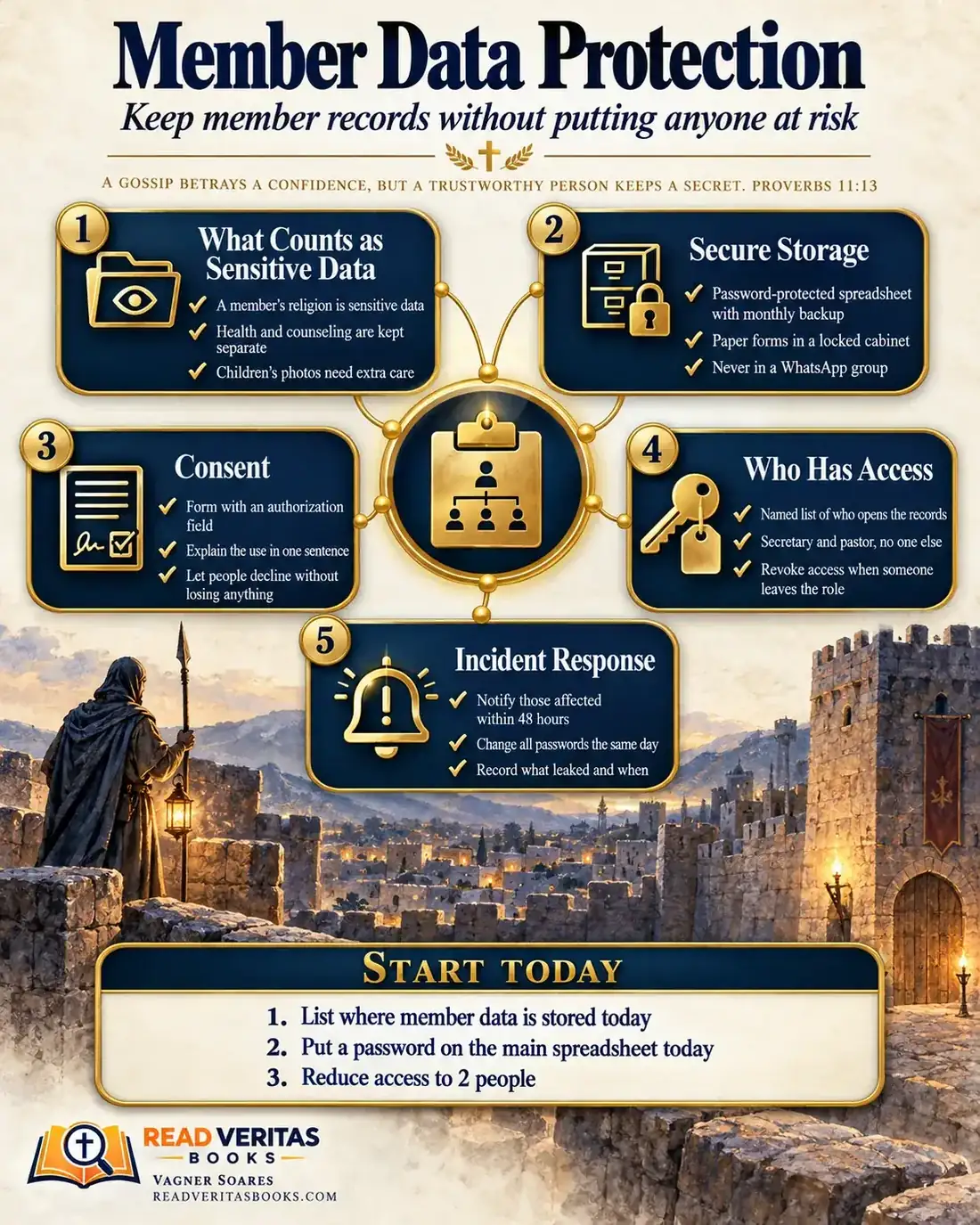
This whole guide on one page
The five steps in this article as an infographic you can print, pin on the notice board or send to your team.
The member form with an address, phone number and baptism date. The spreadsheet of prayer requests. Notes from a counseling session, the children's ministry roster, photos from the last retreat. Every church keeps personal information, and it is usually scattered across phones, drawers and group chats. One lost phone or one file forwarded by mistake is enough for a family to stop trusting the church.
This guide covers what counts as sensitive data, where to keep member records, how to ask for consent, who should have access and what to do if something leaks.
A gossip betrays a confidence, but a trustworthy person keeps a secret.
Proverbs 11:13
Why protecting member data is pastoral care
Someone filling out a form at church is not signing a contract with a company. They are saying "we trust you." They give an address so someone can visit, a phone number so they're remembered on their birthday and, sometimes, a story they have never told anyone. How that information is kept says as much as any sermon on loving your neighbor.
Keeping records is not the problem. Nehemiah gathered the people to be registered by genealogy and found the register of those who had returned first (Nehemiah 7:5). The problem is not knowing who opens the records, where they live and what happens to them when a leader gets a new phone.
Data protection rules differ from place to place, and many of them apply to churches and nonprofits too. This article isn't legal advice: confirm the details with an attorney or accountant you trust.
Advertisement
Faithful with what we've been trusted with: what Scripture says
Proverbs 11:13 sits in a collection of short sayings that contrast two kinds of people. One goes around repeating what they heard; the other, the trustworthy one, keeps the matter hidden. Proverbs 20:19 returns to the theme: "He that goeth about as a talebearer revealeth secrets," so the advice is to keep away from such a person. Neither text is about spreadsheets or privacy laws. They are about character: a trustworthy person does not turn a confidence into conversation.
In 1 Corinthians 4, Paul writes to a church that was comparing and competing over its leaders. He presents himself as a servant of Christ and a steward of the mysteries of God, and reminds them: "it is required in stewards, that a man be found faithful" (1 Corinthians 4:2). A steward managed property that belonged to someone else. Paul's subject is gospel ministry, not office files, but the idea of stewardship helps: a family's data belongs to that family, and the church only looks after it.
After the parable of the unjust steward, Jesus says: "He that is faithful in that which is least is faithful also in much" (Luke 16:10). The context is the use of money and possessions, yet the principle fits here: leaders who are careless with a phone list will hardly be careful with counseling notes. Trust is kept through concrete habits.
What counts as sensitive data in a church
A name and phone number are ordinary personal information. Other details, if exposed, can lead to discrimination, embarrassment or serious harm, and deserve stronger protection. In a church, many of them show up every week.
The whole database reveals faith
Simply appearing in a church's records reveals someone's religion. That is why no part of the member list is unimportant: a spreadsheet with nothing but names and phone numbers, in the wrong hands, already tells which community those people belong to.
Health, counseling and prayer requests
Notes about illness, addiction, marriage problems or delicate prayer requests should not sit in the general database. Keep them separately, ideally accessible only to the pastor who met with the person. Requests read aloud in public need the permission of the person who made them.
Children and teenagers
The children's ministry roster, allergies and who may pick up each child need extra care. Children's photos are posted only with written permission from parents or guardians, and without captions that identify a name or school. The guide to children's ministry safety covers those protocols in detail.
Secure storage for small, medium and large churches
One rule applies to every church: one official location for each type of information, written down in your administrative manual, and as few copies as possible. Lists, forms and photos of documents never go into a WhatsApp group, because once a file is shared it is out of your control. What changes with size is the tool.
Small church (up to about 100 people)
A spreadsheet with a strong password, stored in a cloud service with two-step verification, is usually enough. Make a backup every month and keep it somewhere equally secure. Paper forms go in a locked cabinet, and one named person is responsible for the key.
Medium church (from 100 to a few hundred people)
The spreadsheet starts passing through too many hands. It's worth moving to a shared folder with per-person permissions or to a church management system where each user has their own login. The article on choosing a church management system helps you decide without overspending.
Large or multi-site church
The safeguards need to be written down: a short data protection policy approved by leadership, one person assigned to oversee it and a yearly review of permissions. Each site sees only the members it serves.
Advertisement
Consent: sample wording for the member form
People have a right to know why the church is asking for their information and what will be done with it. You can adapt this sample and place it at the end of your form; have an attorney review it before you use it.
"[Church name] uses the information on this form to keep our member records, organize church life and provide pastoral care. Your information will not be sold or passed on to other organizations. Only the people responsible for our records have full access to it."
"Check what you agree to. If you check nothing, you are still fully welcome and can take part in every activity."
- I agree to receive church announcements and invitations by text message.
- I agree that my small group leader may receive my name and phone number.
- I agree to the use of photos and videos in which I appear on the church's social media.
- As parent or guardian, I agree to the use of [child's name]'s image in church publications, without their name or school.
"You can change these choices at any time. To see, correct or ask us to delete your information, contact [name of the person responsible] at [phone or email]."
Date, full name and signature.
Keep the signed permission with the records. If the purpose changes, explain the change and ask again.
Who has access: a rule for each situation
Risk grows as more people can open the records. The general rule is minimum necessary access: each person sees only what their role requires, and only while they hold it.
- If someone keeps the records (usually the pastor and the secretary), they have full access, with their own login and a password no one else knows.
- If someone leads a small group or ministry, they receive only the names and contact details of the people they look after, in a list the office keeps up to date.
- If someone is the treasurer, they see giving records, but not pastoral notes or the full member form.
- If someone is a temporary volunteer, such as at an event welcome desk, they get a list for that day, returned or deleted at the end.
- If someone steps down from a role, passwords are changed and permissions removed the same day, without making it awkward.
- If someone asks for a quick look at another person's form, the answer is no, however friendly the request.
Keep a written list of everyone with access and the reason, and review it every six months. When Jesus teaches what to do if a brother sins, he says to raise it first "between thee and him alone" (Matthew 18:15). The text is about reconciliation, not records, but it shows a care that applies here: delicate matters start in the smallest possible circle.
Incident response: the plan for the first hours
Incidents happen: a stolen phone, an email sent to the wrong person, a hacked account. The temptation is to keep quiet. Proverbs 28:13 speaks of sin, not data leaks, but its wisdom serves leaders well: "He that covereth his sins shall not prosper." A church that admits a failure and fixes it quickly keeps more trust.
Agree on this plan before you need it. Legal notification deadlines and duties should be confirmed with an attorney; the time frames below are internal standards of care.
- Whoever notices the problem tells the pastor or the person responsible for the records right away, without waiting to have every detail.
- The same day, change the passwords for the spreadsheets, email accounts and systems involved, sign out of every session on the lost device and turn on two-step verification.
- Find out what was exposed: which files, how many people and what kind of data.
- Within 48 hours, tell those affected honestly what happened, which data was exposed, what the church has already done and whom to contact.
- Record everything on an incident sheet, with the date, time, data involved, actions taken and who was told.
- Ask your attorney about any required notifications and, afterward, review with leadership what needs to change.
An example: the spreadsheet that lived on the secretary's phone
Imagine a church of 115 members whose volunteer secretary keeps the member records in a spreadsheet on her own phone. She has sent copies to six small group leaders through the leadership group chat. The pastor keeps counseling notes in a notebook, in the unlocked drawer of his office.
One Monday, one of those leaders has his phone stolen. On it was the full spreadsheet, with names, addresses, birth dates and a notes column where someone had typed prayer requests.
That same day, the leader tells the pastor, who calls the secretary. They change the password on the account linked to the phone, sign the device out remotely and write on an incident sheet what was on it. On Tuesday and Wednesday, the pastor and the secretary phone the families whose requests were in the notes column, and the other members receive a short, honest message.
Then comes the cleanup. The inventory finds the member records in nine different places. The notes column is deleted, and the counseling notebook moves to a locked cabinet. The single spreadsheet goes into a cloud folder with a strong password, open only to the pastor and the secretary, and each leader now receives just the list for their own group. At the yearly update, every form carries the new consent section, and three months later leadership confirms the old copies are gone from the leaders' phones.
First steps for this week
- List every place member data exists today, including leaders' phones, notebooks, email accounts and group chats.
- Put a strong password on the main spreadsheet and turn on two-step verification for the account where it is stored.
- Move any notes on health, counseling or delicate prayer requests out of the general database.
- Write down who has full access and ask everyone else to delete the copies they received.
- Print the incident plan and give it to the people who keep the records.
Frequently asked questions
Do data protection laws apply to churches?
In many places they do, because churches handle personal information about members, visitors and children like any other organization. Rules vary by location, so confirm the details with an attorney or accountant.
Do we need a consent form for every member?
Not every use of data depends on consent, but asking clear permission for messages, photos and sharing with leaders is good practice. Add the permission section to your form and keep the signed copy.
Can we post photos from services on social media?
Let the congregation know when photos or video are being taken and respect anyone who prefers not to appear. For children, post only with a parent or guardian's permission and without naming them.
How long should we keep data from people who left the church?
Ideally, don't keep data without a purpose. Review it once a year, delete what is no longer used and check with a professional which records, such as minutes and accounting documents, must be kept.
Protecting member records is a practical way to honor every family's trust. If you use or plan to use digital check-in at services, apply the same safeguards, and keep the crisis protocol and the church digital security basics close at hand for difficult days.

Vagner Soares is a presbyter with pastoral ordination, a mentor and a digital entrepreneur with more than 10 years of experience in technology, digital marketing and education.
Keep reading
 Church administrationCrisis protocol: what to do in the first 24 hours of an emergency at churchLearn what to do in the first 24 hours of a church crisis: safety first, one spokesperson, clear roles, a written incident record and a review afterward.Read the article
 Church administrationDigital check-in for services and events: is it worth it for your church?Decide with clear criteria whether digital check-in fits your church: benefits, risks, free and paid tools, a gradual pilot and how to handle member data.Read the article
 Church administration · Reference guideThe Complete Church Administration Guide, From Bylaws to Annual ReviewOrganize your church administration in five areas: roles, processes, communication and data, crises and review, with practical steps to start today.Read the article