
Basic digital security for the church: passwords, two-factor and backups
Protect your church accounts with strong passwords, two-factor authentication and backups, and learn to spot the most common scams before they hit.

In this article
- What is at stake when the password lives in a drawer
- Prudence without fear: what the Bible says about keeping watch
- Strong passwords: long passphrases and a shared vault
- Two-factor authentication: a second lock and a spare key
- Common scams: decision rules before urgency decides for you
- Who has access to accounts: a simple register and an exit rule
- Data backup: the right size for each church
- Example: a church of 110 members and a Friday night message
- Mistakes that leave the door open even with strong passwords
- Frequently asked questions
- First steps for this week
Free mind map
This whole guide on one page
The five steps in this article as an infographic you can print, pin on the notice board or send to your team.
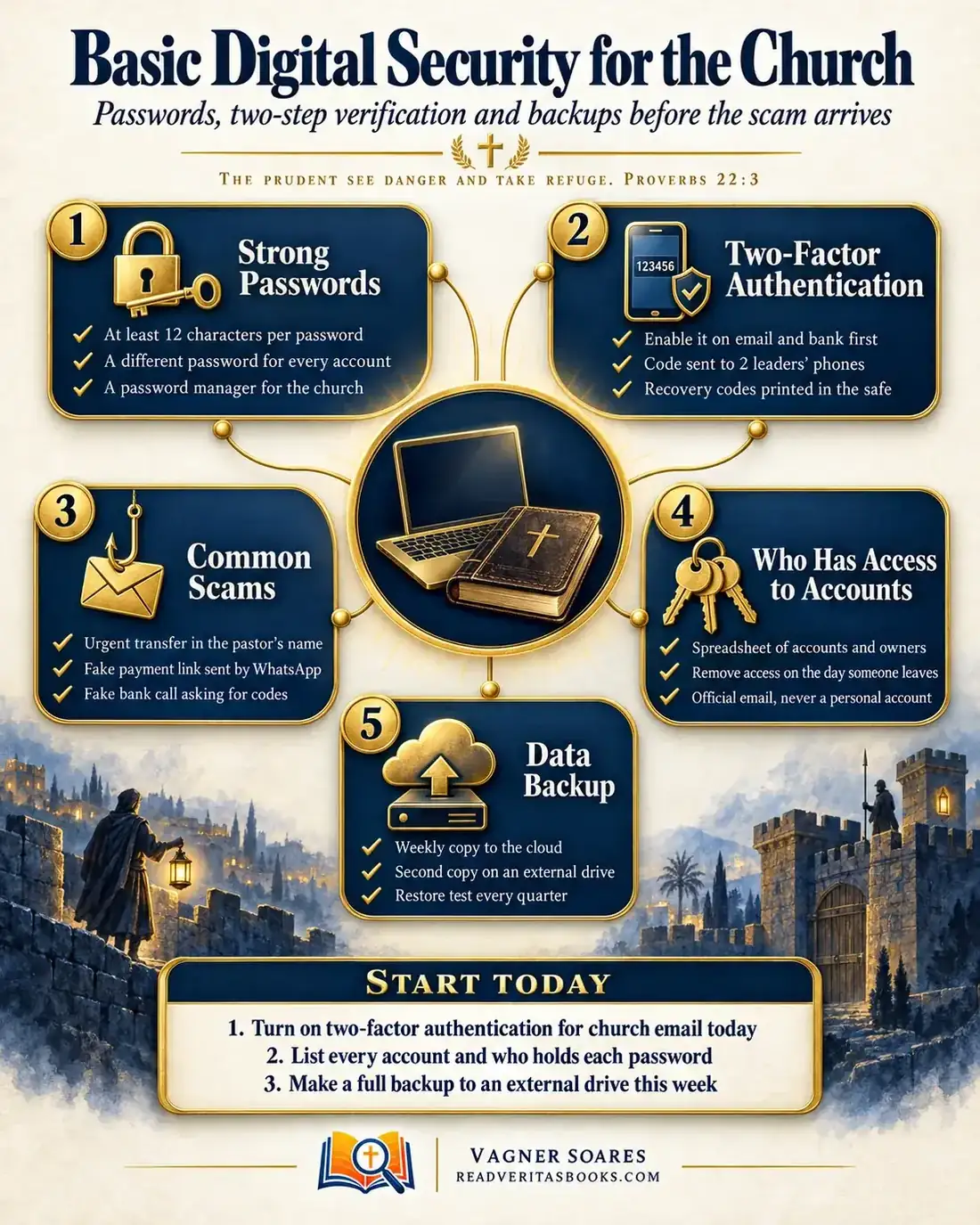
Every church has a digital life today: email, the bank account, social media profiles, the member spreadsheet and years of photos. In many congregations all of it hangs on one old password, written in an office notebook or remembered by someone who left leadership years ago. One convincing message is enough for a church to lose money, contacts and trust.
This guide is written for small teams with no technical background. It covers five areas, in the order they usually fail: strong passwords, two-factor authentication, common scams, control over who has access to accounts, and data backup.
The prudent see danger and take refuge
Proverbs 22:3
What is at stake when the password lives in a drawer
Hardly any church faces a sophisticated attack. What happens is simpler: the email password is the same as the bank password, the church's social profile was opened with the personal email of a young volunteer who moved away, the office computer died and nobody knew where the scanned minutes were.
The cost goes beyond the technical. A hijacked account starts speaking in the church's name, a transfer sent to a scammer is giving that rarely comes back, and an exposed member list is the privacy of families who trusted their leaders. So this isn't only a job for whoever "knows computers". The board sets the rules, even if a volunteer carries them out.
Advertisement
Prudence without fear: what the Bible says about keeping watch
The opening verse comes from Proverbs, a book of practical wisdom. It doesn't promise that trouble won't come; it describes someone who sees danger early and takes cover. In Proverbs 14:15 the same book draws the contrast: "The simple believeth every word: but the prudent man looketh well to his going." People who fall for an online scam have almost always believed a word without checking the next step.
Nehemiah 4:9 shows the balance. The Jews were rebuilding the walls of Jerusalem under threat from their neighbours, and Nehemiah records: "Nevertheless we made our prayer unto our God, and set a watch against them day and night, because of them." Prayer did not replace the guard, and the guard did not replace prayer. It isn't a security manual, but it shows a leader who trusts God and still organizes the watch.
Paul, while carrying the collection for poor believers in Judea, explains in 2 Corinthians 8:20-21 why he would travel with brothers chosen by the churches: "Providing for honest things, not only in the sight of the Lord, but also in the sight of men." He isn't talking about technology. The principle is that whoever handles other people's resources puts visible safeguards in place, protecting both the money and the reputation of those who serve.
When Jesus sent out the twelve in Matthew 10:16, he told them to be "wise as serpents, and harmless as doves". Digital security, then, is neither a lack of faith nor suspicion of fellow believers. It is today's way of being a faithful steward, as 1 Corinthians 4:2 requires.
Strong passwords: long passphrases and a shared vault
A strong password is long, unpredictable and used in one place only. The church name followed by its founding year fails all three tests. Work through these steps in one afternoon, with two leaders sitting together.
- List the accounts that matter most: main email, bank, social media, website and member database. Start with email, because it can reset the password of almost everything else.
- Create a passphrase for each account with four or five unrelated words and at least 12 characters. "Window orange pedal winter" is harder to guess than a short word full of symbols, and easier to type.
- Never reuse a password across two accounts.
- Store everything in a password manager with a shared vault, so the team can use accounts without texting passwords to each other.
- Protect the manager itself with the strongest passphrase of all and with two-factor authentication, because it becomes the key to every other key.
- Record the date of each change in the access register, without writing the password there.
Two-factor authentication: a second lock and a spare key
Two-factor authentication asks for a code, on top of the password, that only the owner of the device receives. Someone who steals the password but doesn't have the phone stays locked out. The real question is which method to use without locking the church itself out.
The methods and their trade-offs
A code by text message is the easiest to set up and far better than nothing, but it depends on a phone number that can be lost or hijacked. An authenticator app generates codes on the device, works without signal and is harder to intercept; in return, you need to set up a second phone as a backup. A physical security key is the strongest option for email and banking, where the service supports it, but it costs money and has to be kept like a real key.
What to watch
- Codes going to one person's phone only. Add a second leader as a backup on critical accounts.
- Recovery codes. Print the ones the service offers and keep them in a sealed envelope.
- The order of setup. Email and bank first, then social media, website and member database.
- Requests for codes from anyone else. No bank and no "tech support" needs the code that arrived on your phone.
Advertisement
Common scams: decision rules before urgency decides for you
The scams that hit churches most often involve no hacking at all. They exploit trust and urgency: the scammer poses as the pastor, a vendor or the bank and pushes someone to act before thinking. Your defense is an answer agreed on before the request ever arrives.
- If a new number asks for an urgent transfer in the pastor's name, don't reply in that chat. Call the number you already have saved, because the agreed rule is that the pastor never asks for transfers by message.
- If the request comes from the known number but the tone or amount is unusual, confirm by voice anyway. Messaging accounts get hijacked too.
- If you receive a payment link by message, pay only through your bank's app and check the recipient.
- If "your bank" calls asking for a password or code, hang up and call the number on the back of your card.
- If someone has already sent money, contact the bank at once through its official channel and write down what happened.
Warn the congregation too, because members get the same scams in the church's name. A notice read during the service is enough: "The church never asks for gifts or transfers through private messages. Contributions are made only through the channels announced in our services and on our website. If in doubt, contact the church office."
Who has access to accounts: a simple register and an exit rule
Over the years, passwords pass from hand to hand: the social media volunteer, the relative who built the website, the former treasurer. The fix is to treat access like any other church asset, recorded, assigned to someone and reviewed. Here is a model ready to copy.
Columns for the access register
- Service (main email, bank, social media profile)
- Login email, always a church address and never a personal one
- Main owner and backup owner
- Who else has access and at what level (admin, editor, view only)
- Two-factor authentication on, and on which device
- Date of the last password change and the last review
The password never goes in the register; it lives in the manager. The register shows who can get in, not how.
Paragraph for your access policy
"All church digital accounts are created with a church email address and recorded in the access register kept by the church office. Each account has a main owner and a backup owner, approved by the board. When a leader or volunteer steps down, the office removes their access and changes any passwords they knew within seven days. The board reviews the register every six months."
The guide on a leader stepping down without a crisis shows how to fit this step into the handover.
Data backup: the right size for each church
A dead laptop, a stolen phone, a file deleted by mistake: a backup is what lets the church start again the next day. The rule applies to everyone: at least two copies in different places, one of them outside the cloud, plus restore tests. What changes with size is the routine.
Small church (up to about 100 people)
One cloud folder with automatic sync holds minutes, bylaws, the member spreadsheet and photos. Once a month the secretary copies that folder to an external drive, which is kept unplugged. Every quarter someone opens three random files from the drive and writes down the date and the result.
Medium church
More people create files: finance, children's ministry, communications. Set up folders by area inside the church account, so nothing important lives only on a volunteer's phone. The external copy becomes weekly, with two drives in rotation, one kept at a different address.
Large church
With paid staff and a church management system, backup belongs in the contract with the provider: where the copies are and how the church exports its data if it switches systems. Keep your own regular export and put the restore test on the annual calendar.
Example: a church of 110 members and a Friday night message
Picture a church of 110 members whose treasurer gets a message on a Friday night from an unknown number showing the pastor's photo: "I'm in a meeting, I need you to send a transfer to a brother in trouble, I'll explain later." The tone feels off, so she calls the pastor, who was having dinner with his family and knew nothing about it.
At the next meeting, the board decides to act. In the first week, the treasurer and the secretary list eleven accounts and discover that the church's social profile is still tied to a former youth leader's email and that the bank password is the same as the email password. They replace both with passphrases, turn on two-factor authentication with the pastor's phone as backup and put the recovery codes in the treasury's sealed envelope.
In the second week, the secretary builds the access register and kindly asks the former youth leader to move the profile to the church email. The pastor reads the notice about transfers during the service. In the third week, the secretary sets up the cloud folder, copies everything to an external drive and puts the monthly copy and the quarterly test on the calendar. The minutes record the decisions, the people responsible and the date of the first review.
Mistakes that leave the door open even with strong passwords
The first is assuming your church is too small to be a target. Scams go out in bulk and don't pick by congregation size.
The second is putting everything in one person's hands, however trustworthy. If they fall ill or lose their phone, the church is locked out of its own accounts.
The third is doing the big clean-up once and forgetting it. Without a review on the calendar, the church is back where it started within a year. If something serious happens, keep the crisis protocol for the first 24 hours at hand.
Frequently asked questions
What makes a strong church password?
A passphrase of four or five unrelated words, at least 12 characters long and used for that account only. Keep it in a password manager, never in a group chat.
How do scams in the pastor's name work?
The scammer uses the pastor's photo and name on a new number, or hijacks his messaging account, and asks someone in the church for an urgent transfer. The defense is an agreed rule that the pastor never asks for money by message, with confirmation by calling the known number.
How does this relate to data protection laws?
Many data protection laws expect organizations to safeguard personal information, and passwords, access control and backups are part of that care. Ask an accountant or lawyer what applies to your church.
First steps for this week
- Turn on two-factor authentication for the main church email today, with a second leader as backup.
- Agree with your finance team, and announce to the church, that no transfer request by message is acted on without a phone call.
- Fill in the access register for your five most important accounts.
- Make a full copy of the church files on an external drive and keep it unplugged.
Digital security is a habit leaders build one step at a time. Next, explore these free tools for small churches, review how to protect member data, bring order to your church WhatsApp groups and pull it all together in a simple digital hub with no coding.

Vagner Soares is a presbyter with pastoral ordination, a mentor and a digital entrepreneur with more than 10 years of experience in technology, digital marketing and education.
Keep reading
 Technology and AIA simple digital hub without coding: service times, groups and giving in one placeBuild a digital hub for your church without coding: pick the right no-code tool, gather service times, groups and giving, and keep it up to date.Read the article
 Technology and AISpreadsheet, app or church management system: what your church needs nowA simple decision guide to choose a spreadsheet, an app or a church management system based on size, budget, team skills and expected growth.Read the article
 Technology and AI · Reference guideComplete guide to technology for churches: from communication to artificial intelligenceA complete guide to technology for churches: essential tools, management systems, digital security, artificial intelligence and using it wisely.Read the article