
Technology and AI · Reference guide
Complete guide to technology for churches: from communication to artificial intelligence
A complete guide to technology for churches: essential tools, management systems, digital security, artificial intelligence and using it wisely.

In this article
- Why the church needs a view on technology
- Tools, craft and prudence in the Bible
- Essential tools: the basics that must work first
- Management systems: from notebook to software, depending on church size
- Digital security: what to do in each situation
- Artificial intelligence: a model usage policy for the church
- Using it wisely: what you gain, what you lose and what to watch
- Example: a church of 195 members bringing order to its technology
- First steps for the next seven days
- Signs that technology is serving rather than ruling
- Frequently asked questions
Free mind map
This whole guide on one page
The five steps in this article as an infographic you can print, pin on the notice board or send to your team.
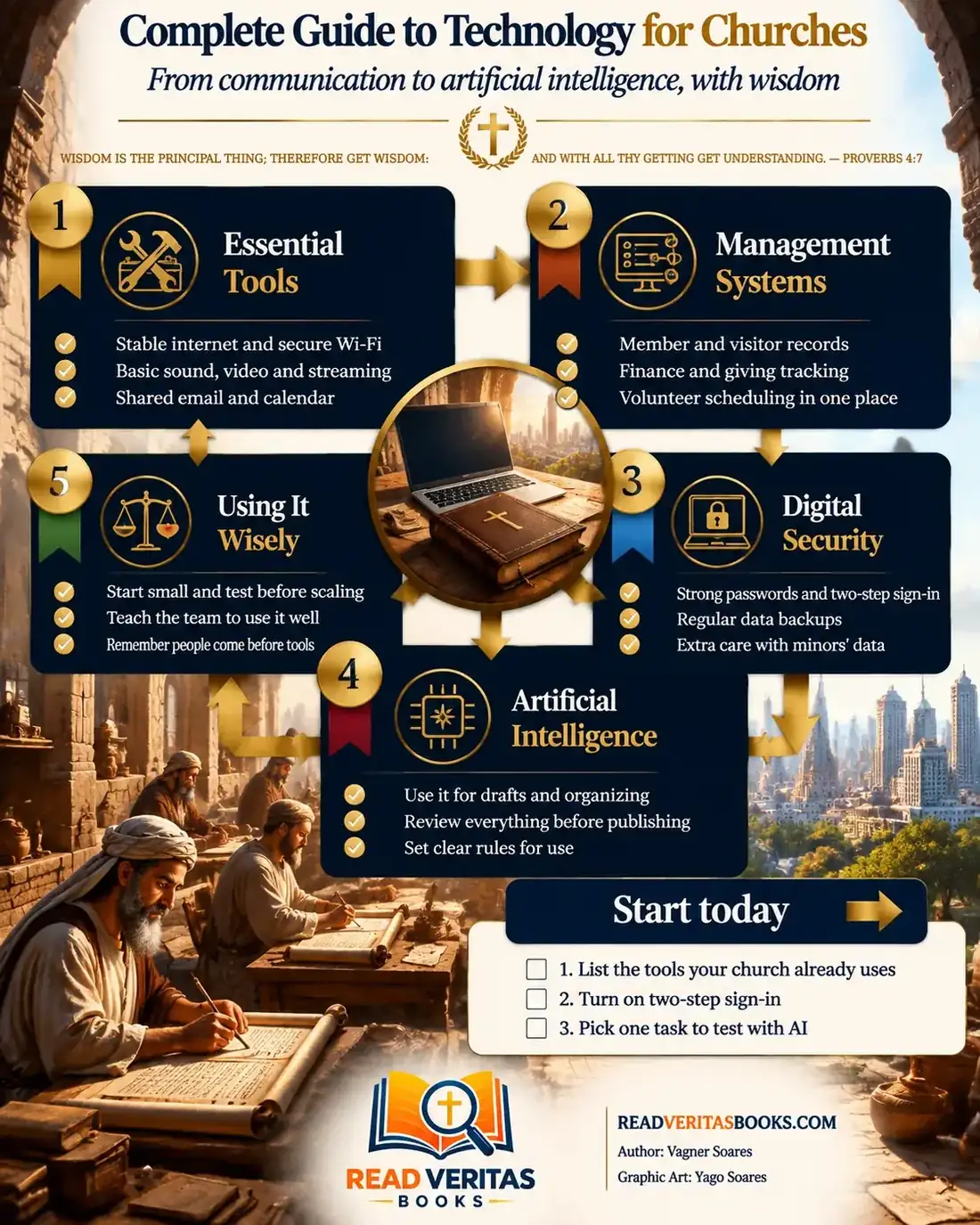
Almost every church already lives surrounded by technology, even if nobody ever decided it should. There is the team's group chat, the service livestream, the volunteer rota spreadsheet, the member records someone keeps somewhere and, now, the artificial intelligence tools the young people already use to draft announcements. The problem is rarely a lack of tools but too many tools with no owner, no rules and no backup.
This guide to church technology follows the order in which the decisions usually arrive: first the basics, then management systems, digital security, the use of artificial intelligence and, finally, the judgment that ties it all together. None of it requires a large investment, only someone willing to look at what already exists and decide calmly.
Wisdom is the principal thing; therefore get wisdom: and with all thy getting get understanding.
Proverbs 4:7
Why the church needs a view on technology
Without a clear view, technology enters the church through the door of convenience. One volunteer opens an account with a personal email address, another keeps the list of donors on their own phone. Each choice makes sense on the day, but together they form a tangle that collapses when one person moves away.
Having a view does not require a long plan, only answers to three questions: what technology should do for our mission, who is responsible for each tool and what we will never hand over to a machine. With those answers, every new decision becomes simpler.
Advertisement
Tools, craft and prudence in the Bible
The Bible does not mention computers, but it does describe people who put craft and tools at God's service. In Exodus 31:1-5 the Lord tells Moses that he has called Bezaleel and filled him "in wisdom, and in understanding, and in knowledge, and in all manner of workmanship", to work in gold, silver, brass, stone and timber for the tabernacle. The passage shows that technical skill can be a gift and a form of service. It does not say that every novelty belongs in worship: Bezaleel worked within a design God had given.
In Luke 14:28-30 Jesus asks which of his hearers, intending to build a tower, "sitteth not down first, and counteth the cost". The main subject is the cost of following Christ, not administration. Yet the illustration works because everyone understood that starting a building without doing the sums is foolish. The same common sense applies to systems and equipment: the cost includes money, training and whoever will look after it later.
Paul, correcting the disorder in the gatherings at Corinth, concludes: "Let all things be done decently and in order" (1 Corinthians 14:40). He was dealing with spiritual gifts and meetings, not tools. The principle is still clear: what the church does together should build up, not confuse. Technology that creates noise, depends on a single person or puts the vulnerable at risk runs against that spirit.
Essential tools: the basics that must work first
Before thinking about a system or artificial intelligence, get the basics working, in this order.
- Take an inventory. In a spreadsheet, list every tool the church uses, what it is for, who manages it, who the second administrator is and what it costs each month.
- Create church accounts. Email, social media, streaming and records should be linked to a church email address, not a volunteer's. Every important account needs at least two people with access.
- Separate the internet networks. The team network, used by the office and the sound desk, should not be the one offered to visitors. Each gets its own password.
- Stabilize sound, video and streaming. Start with what the team can run well every Sunday.
- Set up a shared calendar. One calendar for services, meetings and room bookings prevents clashes and mixed messages.
- Decide where files live. A shared folder with subfolders by area (office, finance, communication, ministries) replaces documents scattered across phones.
To build the page where all of this reaches the congregation, see how to create a simple digital hub without coding.
Management systems: from notebook to software, depending on church size
Proverbs advises: "Be thou diligent to know the state of thy flocks" (Proverbs 27:23). The setting is a herdsman who should not assume his wealth will last on its own. For a church, knowing the state of the flock starts with knowing who the people are, who is arriving and who has disappeared. A church management system is only a means to that, and the right means depends on size.
Small church (up to about 100 people)
A well-organized spreadsheet, kept in a shared folder with restricted access, is usually enough. Have one tab for members, one for visitors, one for rotas and, separately, the finance spreadsheet, open only to the treasurer and the pastor. Ask only for the data the church actually uses.
Medium church (from 100 to a few hundred)
Here spreadsheets start to multiply and nobody knows which version is current. This is the time to evaluate a church management system that brings records, rotas and financial tracking together, with different permissions for each role. Involve the people who will use it every day before deciding, and find practical criteria in how to choose a member management system.
Large or multi-site church
At this scale the system needs a formally named person in charge, written rules on who enters and who edits data, and someone who trains leaders and reviews permissions regularly.
Whatever the size, the rule is the same: choose the simplest tool that solves today's problem, not one that would solve a problem the church might have in five years.
Advertisement
Digital security: what to do in each situation
"A prudent man foreseeth the evil, and hideth himself" (Proverbs 22:3). In practice, foreseeing trouble means deciding in advance what to do when something goes wrong. Agree on the responses below with the leadership and keep them in writing in the office folder.
- If someone leaves the team or changes role, remove their access that same week and change the passwords of the accounts they used.
- If a phone or laptop with access to church accounts is lost, sign out of all open sessions, change the passwords and tell those who need to know.
- If someone receives a message asking for a verification code or an "urgent" transfer in the pastor's name, do not reply on the same channel and confirm by phone.
- If an important account still has no two-factor authentication, turn it on today, starting with email, social media and the records system.
- If the data exists in only one place, set up a regular backup stored somewhere else and check that it opens.
- If the church collects children's data, ask for the minimum, limit access to those responsible for the children's ministry and check local data protection rules with a professional.
For a step-by-step on passwords, two-step sign-in and backups, read the guide to basic digital security for the church. On records, consent and storing information, see how to keep members' data responsibly.
Artificial intelligence: a model usage policy for the church
Artificial intelligence in church can save time on support tasks, but it gets facts wrong, invents quotes and does not know your people. Rather than banning it or allowing everything, approve a short text like this one, adapted to your setting, and record the decision in the minutes.
Our church's policy on the use of artificial intelligence
The church allows artificial intelligence tools to be used as support for drafting announcements, summarizing meetings, generating programme ideas, checking spelling and organizing schedules.
Every text produced with the help of artificial intelligence will be reviewed by a person before it is published. Dates, names, amounts and Bible quotations will be checked against the source.
No personal data of members, information about children, prayer requests, pastoral counselling matters or donors' financial details will be entered into outside tools.
Pastoral decisions, counselling, discipline and care for people remain with the leadership. The tool does not replace prayer, the study of Scripture or the discernment of the church.
Any ministry that wishes to use artificial intelligence will tell the leadership which task it is for. This policy will be reviewed once a year.
Start by testing it on a single task, such as drafting the week's announcements. For more detailed examples and limits, see artificial intelligence in everyday church life.
Using it wisely: what you gain, what you lose and what to watch
Every tool involves a trade-off. Livestreaming the service reaches the sick and those far away, but it can make it easier for some to stop coming. The group chat speeds up announcements, but it also spreads rumours and demands replies at any hour.
So using technology wisely is not a list of approved tools. It is the habit of asking, before adopting anything, who gains, who loses and who will look after it. A good practice is to trial it with one team and one task for a few months, listen to those using it and only then expand.
Watch the team's pace too: a short training session with someone alongside is worth more than a manual nobody reads. And remember that technology should bring people closer: if it starts replacing conversation, visits and the welcome at the door, it is time to step back.
Example: a church of 195 members bringing order to its technology
Picture a church of 195 members where the secretary uses her personal email for everything, the treasurer keeps the finance spreadsheet only on his own laptop and the volunteer who set up the social media accounts has moved away without leaving the password. On top of that, an announcement drafted with artificial intelligence went out with the wrong date for the retreat.
The pastor gathers four people on a Tuesday evening: himself, the secretary, the treasurer and the communications volunteer. In an hour they fill in the inventory spreadsheet: eleven tools, three with no second administrator and one forgotten subscription.
Over the following weeks they follow the order of this guide. The secretary creates the church email address and moves the main accounts to it. The communications volunteer starts recovering the social media account through the platform's own recovery process. The treasurer begins saving a monthly copy of the finance spreadsheet to a shared folder that only he and the pastor can open, and checks that the file opens. Everyone turns on two-factor authentication.
The next month the leadership approves the artificial intelligence policy and records it in the minutes: the date, the approved text and the name of the person who reviews announcements before publication. A review is set for three months later, to decide whether the member spreadsheet is still enough or whether it is time to evaluate a system.
First steps for the next seven days
- Book a one-hour meeting with whoever looks after the office, finances and communication.
- Fill in the inventory spreadsheet together, naming a second administrator for each tool.
- Turn on two-factor authentication for the church's email and social media accounts.
- Back up the most important files and check that the copy opens.
- Bring a draft of the artificial intelligence policy to the next leadership meeting.
Signs that technology is serving rather than ruling
- Nobody is locked out when a volunteer travels or leaves the team.
- The team knows where every file is and which version is current.
- Announcements go out with fewer errors and less rework.
- The time saved goes back into visits, discipleship and welcome.
- New tools come in only after a small trial and a conversation with the people who will use them.
Frequently asked questions
Where should a small church start with technology?
With the basics: a tool inventory, a church email account, two-factor authentication and a tidy spreadsheet for records and rotas. Larger systems can wait until the spreadsheet genuinely stops being enough.
Does the church need to pay for a management system?
Not always. There are free and low-cost options, and well-organized spreadsheets serve many small churches. It is worth paying when the system saves the team real time, improves care for people and has someone responsible for maintaining it.
Is it safe to use artificial intelligence in church?
It can be, as long as there are clear rules. Do not put personal data, prayer requests or children's information into outside tools, and review everything before publishing. Pastoral decisions and care for people stay with the leadership.
What digital tools should every church have?
A church email account, a shared calendar, a file folder with controlled access, a channel for communicating with the congregation and regular backups. Everything else depends on the size of each community.
Technology used well does not draw attention to itself: it frees the church to care for people. To keep going, dig into basic digital security for the church, build a simple digital hub without coding and sort out basic SEO for your website so that people searching for a church in their neighbourhood can find yours.

Vagner Soares is a presbyter with pastoral ordination, a mentor and a digital entrepreneur with more than 10 years of experience in technology, digital marketing and education.
Keep reading
 Technology and AIArtificial intelligence in everyday church life: practical uses and ethical limitsHow to use artificial intelligence in church wisely: simple uses, what not to delegate, human review every time, data privacy and training for your team.Read the article
 Technology and AIA simple digital hub without coding: service times, groups and giving in one placeBuild a digital hub for your church without coding: pick the right no-code tool, gather service times, groups and giving, and keep it up to date.Read the article
 Technology and AIHow to choose a church management system (ChMS) without spending more than you need toChoose a church management system without overspending: what the church really uses, comparing plans, true three-year cost, ease of use and data migration.Read the article