
A simple digital hub without coding: service times, groups and giving in one place
Build a digital hub for your church without coding: pick the right no-code tool, gather service times, groups and giving, and keep it up to date.

In this article
- One place for what people are looking for
- Writing for the one who runs past: what the Bible teaches about clarity
- What the church actually needs: start with the real questions
- No-code tools: which one fits your situation
- Essential hub content: a ready-to-adapt template
- Simple maintenance: who updates, when and where
- Real cost: what "free" doesn't show
- Example: a church of 180 members builds its hub in a month
- First steps for this week
- Mistakes that cost the hub its credibility
- Frequently asked questions
Free mind map
This whole guide on one page
The five steps in this article as an infographic you can print, pin on the notice board or send to your team.
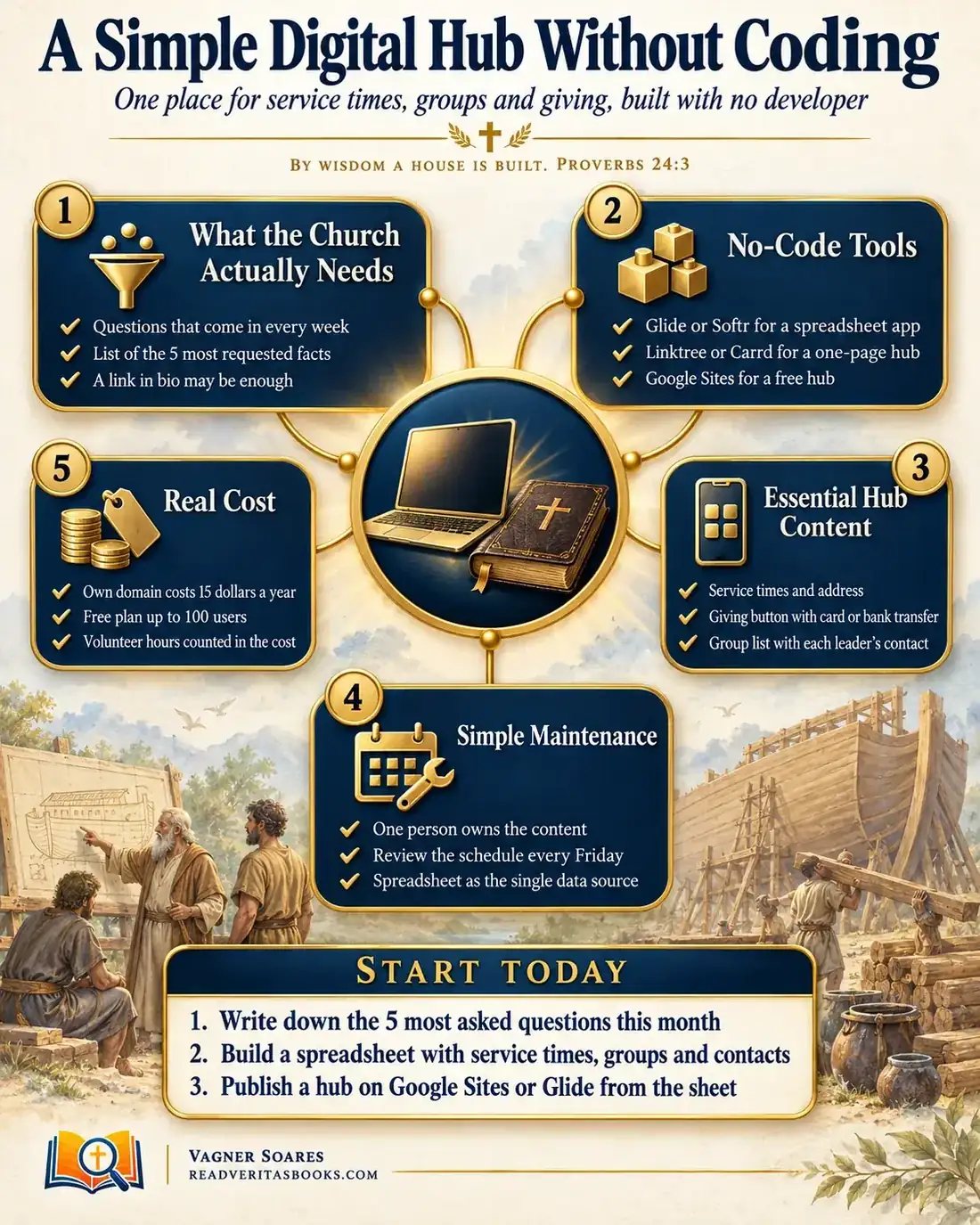
Every week the church office answers the same questions: what time is the service, where does the youth group meet, how can I give. The answers are scattered across an Instagram bio, an outdated website and old WhatsApp messages, and hiring a developer feels out of reach for a small church.
This guide shows you how to build a simple digital hub, one address with the essentials, using no-code tools any volunteer can learn. You'll listen to the real questions, pick the right tool, write for someone who has never walked through your doors and set up a light routine so nothing goes stale.
By wisdom a house is built
Proverbs 24:3
One place for what people are looking for
A digital hub isn't a full website or an app packed with features. It's a page, or a small app, that gathers service times, groups and giving, and you can build it without writing any code. When someone asks a question, the team sends one link and the answer is already there.
Newcomers find your church without having to ask anyone, and the office stops losing hours repeating the same details. With a single source, the three versions of the same schedule floating around the group chats disappear too. That address is what goes in the church link in bio, on the welcome card and in the WhatsApp auto-reply.
Advertisement
Writing for the one who runs past: what the Bible teaches about clarity
When the prophet Habakkuk complained about the injustice of his day, God answered with a vision and a practical instruction: "Write the vision, and make it plain upon tables, that he may run that readeth it" (Habakkuk 2:2). The passage is about a prophetic message with an appointed time, not about communication technique. Still, it shows that an important message deserved to be written down legibly for whoever was passing by.
In Corinth, many were speaking in tongues in the meetings without interpretation, and Paul asks: "except ye utter by the tongue words easy to be understood, how shall it be known what is spoken?" (1 Corinthians 14:9). He has the visitor in mind: if "those that are unlearned, or unbelievers" come in, they will understand nothing (1 Corinthians 14:23). The chapter is about worship, not websites, and it closes with "Let all things be done decently and in order" (1 Corinthians 14:40).
The principle for church administration is simple: the church's information is part of its hospitality. A page full of internal acronyms and expired times works like a locked door for someone who doesn't know anybody yet.
What the church actually needs: start with the real questions
The most common mistake is starting with the tool. The right starting point is the questions people already bring. Follow this order before you open any platform:
- For one month, ask the office, the greeters and whoever runs social media to log every question they get in one shared list, with the question, the channel and the date.
- At the end of the month, group similar questions. "What time is the Sunday service?" and "Is there an evening service?" go in the same group.
- Pick the five groups that come up most. Those five facts are the heart of the hub.
- Check whether your current site or link-in-bio page already answers those five questions on a phone, within a few seconds.
- If it does, improve what you have. If not, that's when you build a new hub.
In most small churches the final list fits on one sheet: service times and address, groups, how to give, how to contact the church and what to expect on a first visit. Anything that didn't show up in the log can wait.
No-code tools: which one fits your situation
No-code tools let you build pages and small apps by dragging blocks and filling in fields. There's no single best tool, only the one that matches the format your church needs and the people who will edit it. Use this decision rule:
- If the five answers fit on one screen with buttons, choose a one-page tool such as Linktree or Carrd. It's the ideal format for the church link in bio.
- If you need a few pages and want zero hosting cost, use Google Sites for churches: with a Google account, several people can edit together.
- If you have many groups and events that change often and someone already keeps them in a spreadsheet, consider Glide or Softr, which turn the spreadsheet into something that feels like an app.
- If only the volunteer who built it can make changes, the tool is wrong for you, however good it looks.
Test the free version with the real content of your five questions. Create the account with the church's official email, never a volunteer's personal one, and have at least two admins. To compare options, see these free tools for small churches and when to use a spreadsheet, an app or a full system.
Advertisement
Essential hub content: a ready-to-adapt template
A good hub answers what a visitor wants in seconds, so the most-asked details go at the top. Here's the order of the blocks, with sample wording you can copy and adjust.
Block 1, at the top. "Welcome to our church. Services on Sundays at 9:00 and 6:00 pm, and Wednesdays at 7:30 pm. (Full street address), neighborhood, city." Right below it, a "Get directions" button with the map and one line about parking and accessibility.
Block 2, first visit. "Visiting for the first time? There's a room for children during the service, and someone at the welcome desk will help you find a seat. Come as you are."
Block 3, groups. One line per group, with a plain-language name, day, time, area and an approved contact: "Couples group, Fridays at 8:00 pm, downtown. Message the church with the WhatsApp button."
Block 4, giving. "You can give during the service or through the church's official channels." The button points to the official giving channel, by card or bank transfer, and the hub never asks for card details on the page itself.
Block 5, contact. The church's official WhatsApp, the office email and office hours. Leaders' personal numbers only with each person's permission.
Then open the link on the phone of someone who wasn't part of the project and ask them to find the service time. If they hesitate, the wording still isn't clear enough.
Simple maintenance: who updates, when and where
A hub with wrong information is worse than no hub, because it earns trust and then lets people down. When the daily distribution to widows broke down in Jerusalem, the apostles asked the church to choose "seven men of honest report, full of the Holy Ghost and wisdom" for that task (Acts 6:3). The passage is about caring for people, not technology, but it shows that recurring tasks need clearly assigned people. The shape depends on your church's size.
Small church (up to about 100 people)
One person owns the content and another is the backup. Leaders send changes to that person instead of editing directly. Every Friday, in ten minutes, the owner checks next week's services, events and announcements.
Medium church
The data lives in a spreadsheet that serves as the single source: the hub pulls from it, and a change made there shows up everywhere. Each leader edits only their own group's row, and the owner reviews everything before Sunday.
Large church
Write down who approves what. The office publishes, the communications team reviews the wording and each area has a weekly deadline for sending changes. Once a quarter, someone outside the team tests every link and phone number.
Whatever your size, keep a short document saying where the spreadsheet lives, who has access and how a change is made, and protect the accounts with basic digital security for the church.
Real cost: what "free" doesn't show
Free rarely means no cost. Jesus used the picture of someone "intending to build a tower" who "sitteth not down first, and counteth the cost" (Luke 14:28). He was speaking about the cost of following him, not about budgets, but the illustration rests on common sense any builder recognizes.
Your own domain, with the church's name, builds credibility and comes with a small annual fee. In return, someone has to own the renewal, because an expired domain takes the hub down without warning. Check both the registration price and the renewal price.
Free plans have limits. The map uses 100 users as a reference, but each tool sets its own and they change. Check the current limits and what happens when you go over: a feature locks, ads appear or billing begins.
The most overlooked cost is volunteer time. Estimate how many hours a month setup and upkeep take, and honor that service. Track amounts and hours in a simple spreadsheet and review it before renewing anything; it also makes reporting to the church easier.
Example: a church of 180 members builds its hub in a month
Imagine a church of 180 members whose part-time secretary spends her afternoons answering the same questions on WhatsApp. The website was built years ago by a member who has since moved away, and nobody has the password.
In the first week, the pastor asks the secretary and the two Sunday greeters to log questions in a shared spreadsheet. By the end of the month, five topics keep coming back: the evening service, the children's room, the youth group, how to give and the address.
At the leadership meeting they decide not to rescue the old site. A young volunteer from the media team creates a Google Sites page with the church's official email and adds the secretary as a second admin. He builds the five-block template, and the treasurer checks that the giving button goes to the official channel.
Before publishing, an older member who wasn't involved tries the link on her phone and can't find the children's room times, which were only on the groups page. That detail moves up to the first-visit block, and only then does the address go into the bio and the WhatsApp auto-reply. The routine is recorded in the minutes: the secretary reviews the times every Friday, and after three months the leadership returns to the question log to see what still comes in.
First steps for this week
- Set up the shared question log and tell the office and the welcome team.
- Find out who has access to the current site, the social accounts and the domain, and record it somewhere secure.
- Build a spreadsheet with service times, groups and contacts, the single source for the hub.
- Choose an owner and a backup before you even choose the tool.
Mistakes that cost the hub its credibility
Building a big app before you know the questions is the most expensive mistake, because it eats weeks of a volunteer's time on features nobody uses. Cramming the home page doesn't help either: when everything is at the top, nothing stands out.
Publishing personal phone numbers without permission, or member lists, is another risk; see how to store member data responsibly. And a past event left in the spotlight for weeks quietly tells visitors that nobody looks after the page.
Frequently asked questions
If the church already has a website, do we still need a hub?
Not always. If your site answers the most common questions quickly and works well on a phone, just tune it up and share its link on social media.
Can we build a church website without coding and without paying anything?
Yes. Tools such as Google Sites publish simple pages with no hosting fees. What usually costs money is your own domain, which is optional at the start, and the time of whoever keeps it up to date.
Is it safe to put a giving button on the hub?
Yes, as long as the button leads to the church's official payment channel and the hub never collects card details. Protect the tool's account with a strong password and two-factor authentication too.
What happens if the volunteer who built the hub leaves?
That's why the account should sit on the church's official email with at least two admins. A short document explaining how it works lets someone else take over without starting from scratch.
A simple, well-kept hub answers most newcomers' questions and gives the office its time back. To keep going, compare these free tools for small churches, learn when to use a spreadsheet, an app or a full system, protect your accounts with basic digital security for the church, write a strong church bio for social media and Google and bring order to your church WhatsApp groups.

Vagner Soares is a presbyter with pastoral ordination, a mentor and a digital entrepreneur with more than 10 years of experience in technology, digital marketing and education.
Keep reading
 Technology and AI · Reference guideComplete guide to technology for churches: from communication to artificial intelligenceA complete guide to technology for churches: essential tools, management systems, digital security, artificial intelligence and using it wisely.Read the article
 Technology and AIBasic digital security for the church: passwords, two-factor and backupsProtect your church accounts with strong passwords, two-factor authentication and backups, and learn to spot the most common scams before they hit.Read the article
 Technology and AIArtificial intelligence in everyday church life: practical uses and ethical limitsHow to use artificial intelligence in church wisely: simple uses, what not to delegate, human review every time, data privacy and training for your team.Read the article