
Spreadsheet, app or church management system: what your church needs now
A simple decision guide to choose a spreadsheet, an app or a church management system based on size, budget, team skills and expected growth.

In this article
- Spreadsheet, app or full system: what each one really does
- Counting the cost before you build: what Scripture teaches about deciding wisely
- Church size: three ranges and how to adapt each one
- Complexity of the need: an inventory to fill in before any demo
- Available budget: how to work out the real 12-month cost
- Learning curve: the trial that shows whether your team will use it
- Future growth: choosing for two or three years without getting locked in
- A worked example: the church of 170 members and its three spreadsheets
- Mistakes that make a church switch tools twice
- Frequently asked questions
- First steps for this week
Free mind map
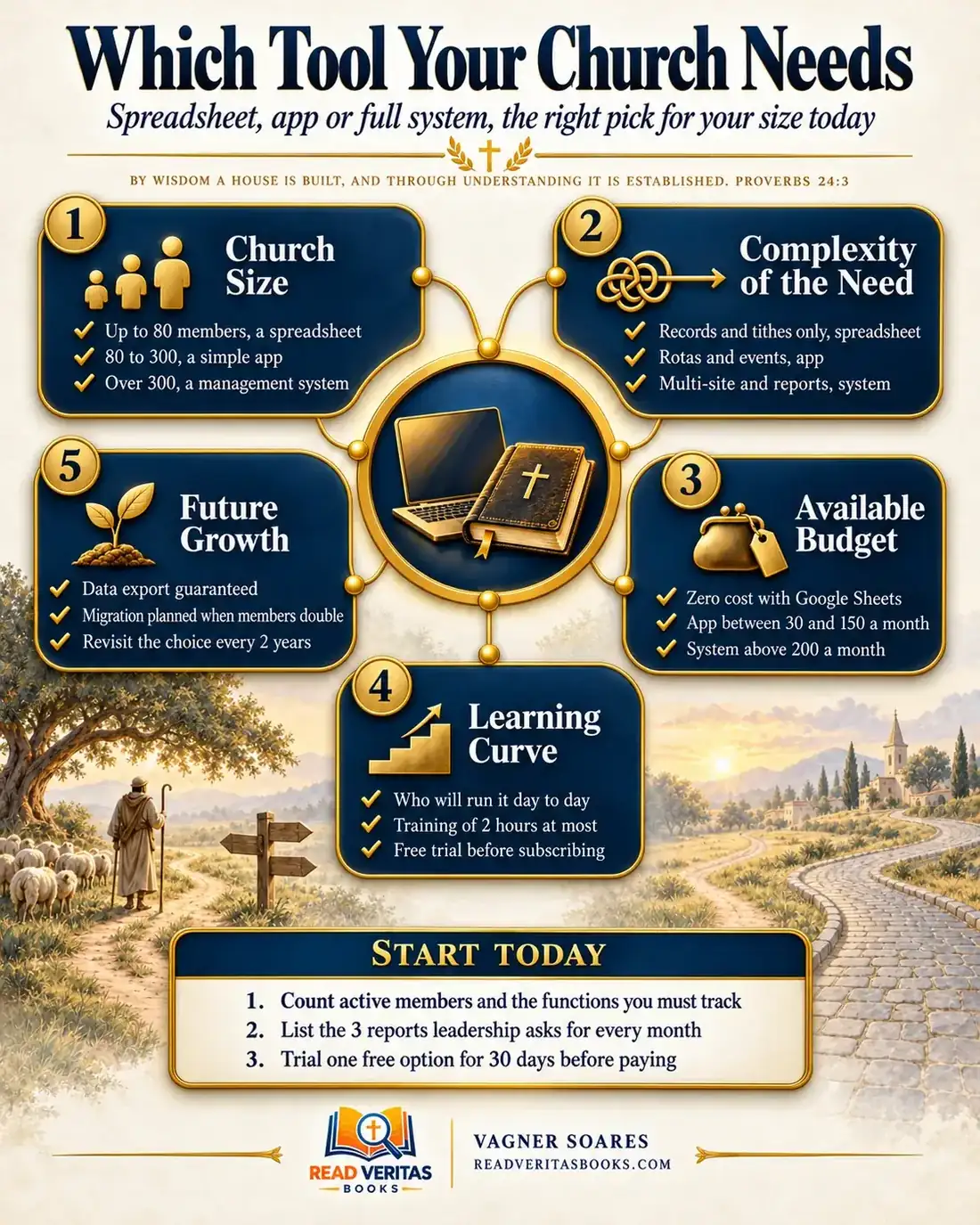
This whole guide on one page
The five steps in this article as an infographic you can print, pin on the notice board or send to your team.
The conversation usually starts like this: a leader saw a full church management system at another church and suggests signing up that same week. The treasurer defends the spreadsheet he has used for years. The secretary, who actually types in all the data, wasn't even invited to the meeting. In the end nobody can say what problem the new tool should solve, so the decision gets made on enthusiasm or postponed out of fear of cost.
This guide starts from a different question: what does our church need to track right now, with the people and money it has? To answer it, we use five criteria: church size, complexity of the need, available budget, learning curve and future growth.
By wisdom a house is built, and through understanding it is established
Proverbs 24:3
Spreadsheet, app or full system: what each one really does
A church spreadsheet is a file with tabs (members, giving, events) that someone keeps up by hand. It is free or nearly free, flexible and familiar, but it depends entirely on the discipline of whoever maintains it, and it never warns anyone when something is wrong.
A church app is a ready-made tool, usually on a subscription, that does a few jobs well: member records, volunteer rotas, registrations, announcements on people's phones. A church management system (church management software, or ChMS) brings several areas into one database: members, finances, ministries, reports and sometimes more than one site. It gives more control, but costs more in money, setup and training.
Choosing a tool is a matter of stewardship: every dollar spent on technology can't go to another ministry, and every volunteer hour spent typing the same data twice is an hour less of caring for people.
Advertisement
Counting the cost before you build: what Scripture teaches about deciding wisely
In Luke 14:28-30, Jesus speaks to the crowds following him and uses an everyday picture: which of you, intending to build a tower, "sitteth not down first, and counteth the cost"? The subject there is the cost of discipleship, as Luke 14:33 makes clear, not a budgeting manual. But the illustration only works because everyone agreed on the obvious: sensible people do the math before they start.
In Exodus 18:17-18, Moses is settling the people's disputes alone, from morning to evening. Jethro, his father-in-law, watches and says, "The thing that thou doest is not good", because "thou art not able to perform it thyself alone." The solution he proposes in Exodus 18:21 is to share the work with able, God-fearing men set over groups of thousands, hundreds, fifties and tens. The text says nothing about tools. It describes a structure that had to change because the work had grown too large for the old model.
Proverbs 27:23 completes the picture: "Be thou diligent to know the state of thy flocks". It is counsel to someone who lives from a flock to pay close attention to what sustains the household.
The principle for church administration: tools exist to help you know and care for people, and structure should match the real size of the work. Counting the cost and changing the model when it no longer copes is prudence, not a lack of faith.
Church size: three ranges and how to adapt each one
The map for this article uses two thresholds: up to 80 members, a spreadsheet; 80 to 300, a simple app; over 300, a church management system. They are practical references, not rules. Count only active members, not the historical list: a church with 250 names on file and 110 people attending belongs in the middle range. Recount once a year.
Small church (up to about 80 to 100 people)
A well-built spreadsheet does the job: one tab for members, one for giving, one for events, always with the same columns. What matters most is a named person in charge and a backup copy. If nothing is organized yet, start with these free tools for small churches.
Mid-sized church (80 to 300)
This is where rotas for several ministries, small groups and announcements to many people show up. The spreadsheet starts spawning side copies: one for worship, one for children, one for welcome. A simple app focused on member records and rotas usually removes those copies, and finances can stay in a spreadsheet if the treasurer knows it well.
Large church (over 300)
With many teams, several leaders accessing data and reports for a board or members' meeting, an integrated system makes sense. The question becomes who administers it, who can see what and how member data is protected.
Complexity of the need: an inventory to fill in before any demo
Size isn't everything. A church of 90 people with two congregations may need more features than a church of 250 with a simple routine. Before you sit through any vendor demo, gather the people who handle the data today, copy these questions into a document and answer them in writing.
- What information do we record today? (members, tithes and offerings, rotas, events, small groups, property)
- Where is each piece of data kept, and who updates it?
- Which data do we type in more than one place?
- Which three reports does leadership ask for every month, and how long do they take to prepare?
- Which task depends on one person and stops when that person is away?
- Do we have more than one site that needs consolidated reports?
If tracking comes down to members and giving, a standardized spreadsheet will do. If the pain is in rotas, registrations and announcements, an app saves hours. If there are several sites and processes that depend on each other, a system starts to justify itself. Your answers become the list of requirements you show the vendor, instead of letting the vendor show you their feature list.
Advertisement
Available budget: how to work out the real 12-month cost
The ranges on the map (zero cost with Google Sheets, apps between 30 and 150 a month, systems above 200 a month) are only a starting point, because amounts vary by provider, currency and plan. To compare honestly:
- Ask for a written quote for the plan that covers your inventory, not for the cheapest plan on the website.
- Ask about setup fees, pricing per user or per member on file, and price increases.
- Add up the annual figure: monthly fee times twelve, plus setup and any add-on modules.
- Estimate the hidden cost: how many hours a week someone will spend entering data. A free option that doubles the typing isn't free for the volunteer.
- Put the total next to the church budget and ask which ministry would go without that money.
Only take on the subscription if it fits comfortably, even in a month when giving is lower.
Learning curve: the trial that shows whether your team will use it
A powerful tool that nobody can use brings no benefit. So the decision should come from a trial, not a demo. Use the free period (30 days, for example) with real data and with the people who will run the tool every week, and favor solutions they can learn in about two hours of hands-on training. At the end, apply this rule:
- If the people running it handled the week's tasks on their own after training, the tool passes.
- If the team needed help at every step, book a second session; if nothing changes, drop the option, however good it looks.
- If only the most tech-savvy person managed to use it, you'd be trading one dependency for another.
- If support didn't respond during the trial, or doesn't work in your language, expect the same after you subscribe.
Future growth: choosing for two or three years without getting locked in
Today's choice should handle the growth you expect without forcing a painful migration the following year. But paying now for features you won't need for years is waste. A simpler tool costs less and gets adopted faster, though it may require a migration if the church doubles. A more robust system avoids moving early, but charges for idle features and can discourage a small team. No option is free of cost; there is only the trade-off you choose with your eyes open.
Member data belongs to the church. Confirm that you can export everything, at any time, in an open format such as a spreadsheet, and run a test export during the free trial. Ask who at the provider can access the data and what happens if the contract ends. Check the privacy rules that apply to you and confirm the contract terms with a lawyer. For everyday practice, see member data protection and basic digital security for churches.
Write two review triggers into the meeting minutes: a date (every two years) and a number (when active members double).
A worked example: the church of 170 members and its three spreadsheets
Imagine a church with 190 names on file and about 120 active members. The treasurer keeps a giving spreadsheet that works well. The volunteer secretary looks after the member spreadsheet. The children's and worship ministries build their rotas in messaging groups. The pastor has come back from a conference wanting to sign up for a full system.
Instead of deciding on the spot, the board meets with the treasurer, the secretary and the two rota leaders. They fill in the inventory and find that birthdays are typed in two places, that the children's rota fell through twice this semester and that the monthly financial report takes an evening but comes out right.
By size, the church is in the middle range; by its pain points, the trouble lies in rotas and member records, not finances. The secretary requests two app quotes and one system quote, and the treasurer works out the 12-month cost of each. The full system would cost more per year than the entire children's ministry budget.
The board trials the simplest app for 30 days. After a training session of just over an hour, the secretary and both rota leaders put together the month's rota on their own. At the end of the trial, the secretary exports everything to a spreadsheet and checks that every field came through.
The decision goes into the minutes: member records and rotas move to the app, finances stay with the treasurer, and the old member spreadsheet is archived so nobody types into it again. The minutes name the person responsible (the secretary), a review in two years and a trigger of 240 active members for considering an integrated system.
Mistakes that make a church switch tools twice
- Deciding by the vendor's feature list instead of the inventory the church wrote itself.
- Leaving the people who will enter data every week out of the decision.
- Keeping the old spreadsheet "just in case", which creates two versions of the truth within months.
- Migrating everything at once, in the busiest month of the calendar, instead of starting with one area.
Frequently asked questions
Is a spreadsheet less professional than paid church management software?
No. For many churches, a well-organized spreadsheet is exactly the right tool. Professionalism comes from consistent records and a clear person in charge, not from the price of the software.
How do I know when to move beyond a spreadsheet?
When it starts producing frequent errors, duplicate data or side copies in every ministry, or takes a disproportionate amount of your team's time. Those signs mean it's time to evaluate an app.
Can we use more than one tool at the same time?
Yes, as long as each one has a clear job and no data is typed in two places. A common combination is finances in a spreadsheet, member records and rotas in an app. Decide which tool is the official source for each piece of information.
How do I choose church software without being led by the salesperson?
Bring your completed inventory and ask the vendor to show how the tool handles each item. Compare the annual cost and insist on a trial with your real team before you sign. To go further, see how to choose a church management system.
First steps for this week
- Count active members, separated from the historical list, and note which range your church falls into.
- Book a 40-minute meeting with the people who handle the data and fill in the inventory together.
- If you already pay for a tool, run a test export today and save the file.
The right tool is the one that solves your church's real problem at the size it is today, and that your team can keep up without burning out. If you'd rather start at no cost, these free tools for small churches will help you take the first step. To bring service times, groups and giving together in one place, see how to build a simple digital hub without coding, and keep strengthening your member data protection.

Vagner Soares is a presbyter with pastoral ordination, a mentor and a digital entrepreneur with more than 10 years of experience in technology, digital marketing and education.
Keep reading
 Technology and AIBasic digital security for the church: passwords, two-factor and backupsProtect your church accounts with strong passwords, two-factor authentication and backups, and learn to spot the most common scams before they hit.Read the article
 Technology and AIFree tools every small church should know about to get organizedFree tools that help a small church organize communication, scheduling, design, finances and files, plus a simple plan to get started today.Read the article
 Technology and AI · Reference guideComplete guide to technology for churches: from communication to artificial intelligenceA complete guide to technology for churches: essential tools, management systems, digital security, artificial intelligence and using it wisely.Read the article