
Church WhatsApp without the chaos: how to organize groups and announcements
Organize your church WhatsApp with groups by purpose, usage rules, messaging hours and pinned announcements so important notices never get buried.

In this article
- Why the church group turns into chaos
- A noisy church and two lessons in order
- Groups by purpose: let the size of your church decide how many
- Usage rules: a ready-made text for the group description
- Messaging hours: what to do with each kind of message
- Pinned announcements: the weekly routine in five steps
- Moderation: what you gain, what you lose and what to watch
- An example: the church with fourteen groups
- First steps for this week
- Signs your church WhatsApp is working
- Frequently asked questions
Free mind map
This whole guide on one page
The five steps in this article as an infographic you can print, pin on the notice board or send to your team.
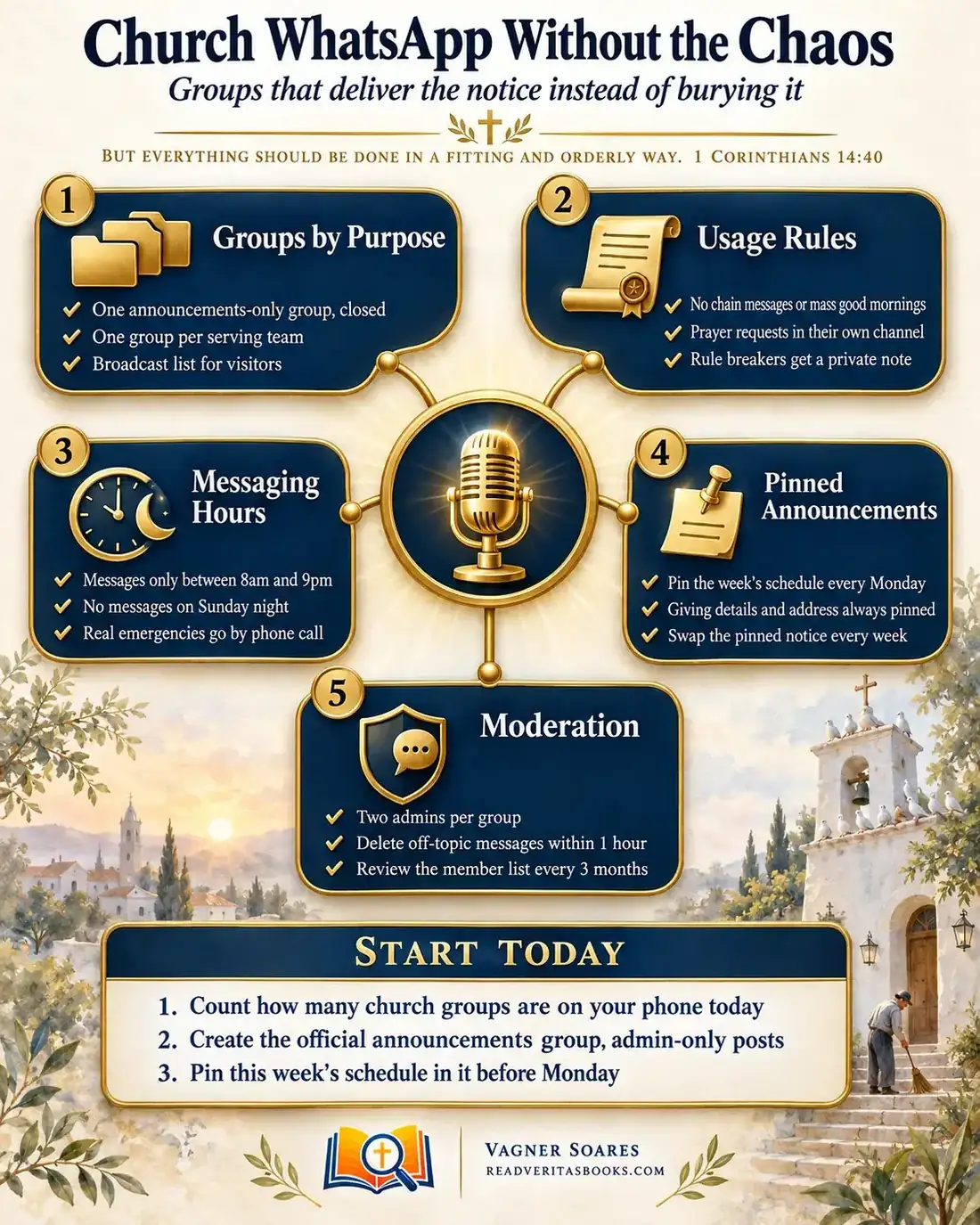
You open your phone and find dozens of messages in the church group: good-morning stickers, a chain message, three prayer requests, a debate about parking. Somewhere in the middle, buried, is the notice that Sunday's service time has changed. The next week, half the congregation shows up late.
Church WhatsApp is the most practical way to reach your members, but without some order it turns into noise. This guide shows you how to split church WhatsApp groups by purpose, agree on usage rules, set messaging hours, use pinned announcements and moderate with a light touch, so the important notice reaches the people who need it.
But everything should be done in a fitting and orderly way
1 Corinthians 14:40
Why the church group turns into chaos
No church plans its own chaos. Someone creates a group for the retreat, another for the Christmas rehearsal, another for the children's parents. The retreat ends, the group stays. Two years later, nobody knows who runs half of them and the main group has become a town square.
The cost shows up on two sides. Members get tired and mute notifications, and from then on they miss exactly the notice that matters. Leaders post the same message in four places and still hear on Sunday that nobody was told. Church internal communication starts to depend on luck. Switching apps will not fix that. A few simple agreements, explained kindly and kept consistently, will.
Advertisement
A noisy church and two lessons in order
In 1 Corinthians 14, Paul addresses the worship of a church full of gifts and full of confusion: several people speaking at once, tongues without interpretation, prophecies tripping over one another. Paul does not silence anyone for good. He brings order. Each person may bring a contribution, but "Let all things be done unto edifying" (1 Corinthians 14:26), and the reason is theological: "God is not the author of confusion, but of peace" (1 Corinthians 14:33).
The passage says nothing about phones. The principle still applies honestly: when many voices compete for the same space, the message that builds people up gets lost. Order here is not control. It is what allows everyone to be heard.
The second lesson comes from Acts 6:1-4. The church in Jerusalem grew and a complaint arose, because the Greek-speaking widows "were neglected in the daily ministration". The text accuses no one of bad faith: the way of serving had not kept up with the growth. The apostles asked the community to choose seven men of good reputation and appointed them over that task.
For church administration, the application is direct. When someone complains that they were not told, ask where the system failed, and give each part of communication a named person responsible, instead of expecting the pastor to handle everything.
Groups by purpose: let the size of your church decide how many
In any church, each group needs a purpose that fits in one sentence. If you cannot say what a group is for and who needs to be in it, maybe it should not exist. What changes with size is how many groups make sense.
Small church (up to about 100 people)
Three groups are usually enough. One announcements group, closed, where only admins can post. One group for leaders and rotas, where those who serve sort out the details. And one prayer group or list, with someone responsible for following up on requests.
Medium church (100 to 400 people)
This is where one group per serving team comes in (worship, greeters, children's ministry, media), so each team can plan rotas without pinging the whole church. The WhatsApp Communities feature is worth using: it brings several groups under one name and includes an announcements group that reaches everyone at once. For visitors, a broadcast list lets you send a welcome without exposing anyone's number. Remember that messages only reach people who saved the church's contact.
Large church (over 400 people)
Keep the official channel for what applies to everyone and let each ministry or small-group area run its own announcements. Someone needs to hold the master list of every group, with purpose and admins, in a spreadsheet or in the church management system. Without that list, orphaned groups multiply.
Usage rules: a ready-made text for the group description
Short rules prevent long conflicts. You can copy this template into the announcements group description and adapt it for the others. Review it with your leaders before posting.
Text for the group description
"Welcome to the church's official announcements group. Here we only post church information: times, schedule changes, events and messages from the leadership.
To keep this group useful for everyone, we have agreed on the following.
- We do not send chain messages, mass good mornings or content from outside the church.
- Prayer requests go to the prayer group, where someone follows up on each one.
- Messages are sent between 8am and 9pm, and nothing is sent on Sunday evening.
- Questions about an announcement can be sent privately to the admins.
Thank you for helping our church communicate with order and care."
Private message for someone who broke the rule
"Hi, how are you? I saw your message in the announcements group and I know you meant well. Just a reminder that we keep only church announcements there, so nobody misses anything important. If you would like to share it, the fellowship group is the right place. Thanks so much for understanding!"
Notice the tone: private, short and without scolding. Jesus teaches that when a brother sins against us, the first step is to speak "between thee and him alone" (Matthew 18:15). A sticker in the wrong group is far from a sin, but if even a serious case starts in private, a small slip does not deserve public exposure.
Advertisement
Messaging hours: what to do with each kind of message
Messages at any hour steal people's rest and suggest that everything is urgent. When the disciples came back worn out and "had no leisure so much as to eat", Jesus called them to a quiet place: "Come ye yourselves apart into a desert place, and rest a while" (Mark 6:31). Protecting the rest of those who serve is pastoral care too.
Agree with your leaders on a sending window, between 8am and 9pm, and keep Sunday evening free. Then use this decision rule for every message.
- If the notice is administrative and came up outside the window, write it now and schedule it or save it for the next morning.
- If the matter cannot wait until tomorrow, such as a change of venue a few hours before the service, call the person responsible instead of posting in the group.
- If the message is for one person, send it privately, never in the group.
- If it is something many people will look for again during the week, post it and pin it.
- If you are unsure whether it is urgent, it almost never is. Wait for the agreed hours.
Proverbs 25:11 puts it in one picture: "A word fitly spoken is like apples of gold in pictures of silver."
Pinned announcements: the weekly routine in five steps
Pinning keeps what people look for most in plain sight, so no one has to repeat everything each week. The key is turning it into a routine with an owner and a fixed day.
- Decide who looks after pinned announcements. It can be the church office or a communications volunteer, with a backup for holiday weeks.
- Every Monday, by mid-morning, post the week's schedule with the times of services, meetings and rehearsals, in a short text that always uses the same format.
- Pin that message and unpin the previous week's. When you pin it, check the duration you chose, because the app can unpin the message automatically after a while.
- Keep a second, permanent pinned message with the official giving details and the church's address. The treasurer should check it whenever any detail changes.
- If something changes midweek, edit or repost the schedule and pin the new version, saying in the first line what changed.
Moderation: what you gain, what you lose and what to watch
No rule works without someone to look after it. Moderation does not have to be strict; it has to be present. When members see that a group is being cared for, they start honoring the agreements themselves.
Trade-offs your leaders need to choose
A closed group guarantees no announcement gets lost, but it removes the feeling of conversation; an optional fellowship group alongside makes up for that. Deleting off-topic messages quickly keeps the group clean, but deleting without explanation feels like censorship. Remove them within an hour and send the private message from the template above right after.
Two admins per group prevent overload, but too many admins dilute responsibility. Two or three, with names people know, is enough. Paul asks that our words be "good to the use of edifying" (Ephesians 4:29), and that applies to the tone of whoever moderates as well.
The member list
People who have left the church keep receiving notices and seeing everyone's phone numbers. Review each group's list every quarter, confirm who is still part of the church and gently remove those who have moved on, ideally with a thank-you message. Privacy laws where you live may apply to those numbers; see how to store members' data responsibly and check with a lawyer if you are unsure.
An example: the church with fourteen groups
Take a church of 150 members that, without noticing, has built up fourteen WhatsApp groups. The main group has more than 200 participants, including visitors from years ago and families who have moved away. One Saturday, the change of Sunday's service from 6pm to 7pm is posted at 10pm and gets lost among dozens of birthday greetings.
At the next leadership meeting, the pastor asks the church secretary to take an inventory. She opens a spreadsheet with four columns: group name, purpose, admins and date of the last useful message. The result shows four groups that have been inactive for months and two worship groups doing the same job. The leaders decide, and the decision goes into the minutes: the main group becomes announcements-only, the inactive groups will be closed and the two worship groups will merge.
The following Sunday, the pastor explains the change from the pulpit in two minutes, speaking about care rather than prohibition. The deacon in charge of media posts the rules in the description and creates an optional fellowship group. The secretary takes on the Monday routine, and the treasurer checks the pinned message with the giving details.
Three months later, at the quarterly review, the admins thank those who no longer attend and remove their numbers, and the secretary records the change in the spreadsheet. The sign that it worked came in a small detail: the last Sunday the service time changed, nobody arrived late.
First steps for this week
- List every church group that exists today, with its purpose and admins, in a simple spreadsheet.
- Take the list to your leaders and decide which groups stay, which merge and which will be closed.
- Set the announcements group so only admins can post, and paste the rules template into the description.
- Choose who looks after pinned announcements and post the first weekly schedule next Monday.
Signs your church WhatsApp is working
The new order is working when church announcements on WhatsApp get read without anyone repeating them from the pulpit, and when questions like "what time is the service?" fade because people have learned to check the pinned message. It is also a good sign when leaders stop getting messages late at night.
If complaints about missed notices continue after two months, go back to the inventory: there is probably still a parallel group doing the job of the official one.
Frequently asked questions
Should we replace WhatsApp with another app?
In most cases, no. People already use WhatsApp every day, and organizing your groups solves more than a new tool would. For people who never open WhatsApp, it helps to have a second channel, such as church email.
How many WhatsApp groups should a church have?
Enough to separate the main purposes. In a small church, three are usually enough: announcements, leaders and prayer. Larger churches add one group per serving team, always with someone keeping the list of every group.
How do we introduce new rules without offending anyone?
Explain the reason before the rule: the goal is for no one to miss what matters. Mention the agreements briefly during a service and apply them gently, with corrections always in private.
Organizing your church WhatsApp does not take a new tool, just simple agreements kept consistently and one person responsible for each part. To go further, see how to build internal communication where everyone knows what is happening, why no one reads your church's posts and how to handle basic digital security for your church.

Vagner Soares is a presbyter with pastoral ordination, a mentor and a digital entrepreneur with more than 10 years of experience in technology, digital marketing and education.
Keep reading
 Marketing and communicationHow to Use Short Videos to Reach People Who Have Never Been to ChurchA practical guide to church short videos shot on a phone: formats that work, a simple script, where to post, and a pace your volunteers can actually keep.Read the article
 Marketing and communicationWhy no one reads your church's social media posts (and how to fix it)Learn the mistakes that make your church's posts invisible and how to fix them with a strong hook, plain language and one clear call to action.Read the article
 Marketing and communication · Reference guideComplete guide to marketing and communication for churches: from identity to distributionA complete guide to church communication: identity and voice, a content calendar, digital channels, handling image crises and the metrics that matter.Read the article