
Digital check-in for services and events: is it worth it for your church?
Decide with clear criteria whether digital check-in fits your church: benefits, risks, free and paid tools, a gradual pilot and how to handle member data.

In this article
- Counting people in the Bible: when it is care and when it is pride
- Benefits of check-in: what it actually solves
- Drawbacks and risks: the cost that isn't on the invoice
- Available tools: from a simple form to a full system
- Gradual rollout in four stages
- Data and privacy: the notice that goes on the form
- A worked example from start to finish
- Signs your check-in is working
- Mistakes that make churches give up on check-in
- Frequently asked questions
Free mind map
This whole guide on one page
The five steps in this article as an infographic you can print, pin on the notice board or send to your team.
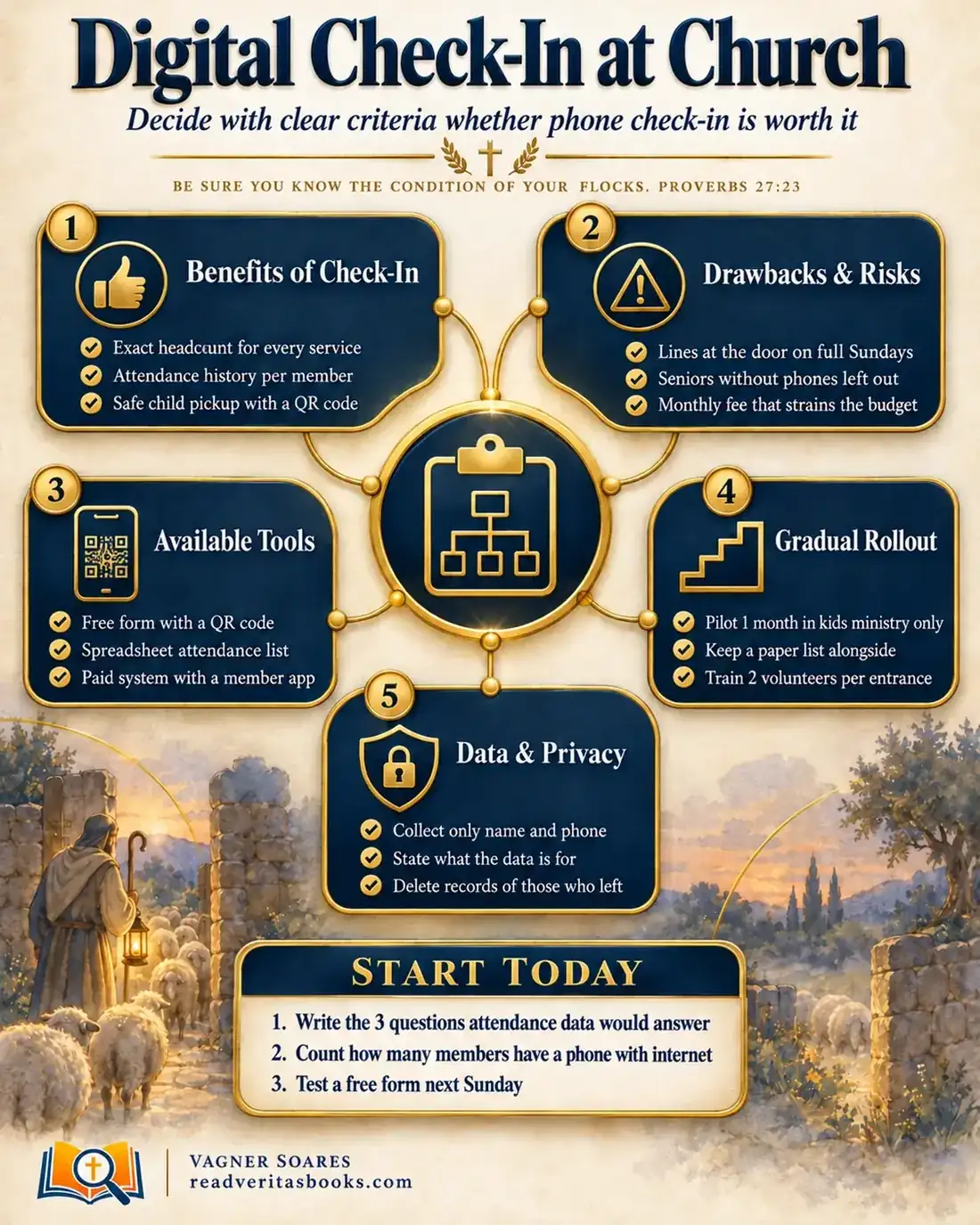
A full Sunday, kids arriving for children's ministry, visitors looking for a seat, and someone on the leadership team asks: how many people came today? Who hasn't been here in a month? Many churches answer with a guess or a quick count from the back row. That's when the idea of digital check-in by phone comes up, along with a question: will it help, or just add one more task and expense?
The honest answer: it depends on what your church wants to know and who will act on it. An attendance list nobody reads is just digital paper. A list that leads to a phone call to the family that disappeared three weeks ago is pastoral care with a method.
Be sure you know the condition of your flocks.
Proverbs 27:23
Counting people in the Bible: when it is care and when it is pride
Some believers distrust any kind of church attendance tracking, as if counting were a lack of faith. In Numbers 1:2, the Lord himself tells Moses to take a census of the congregation by families, "with the number of their names". In Acts 2:41, Luke records that on the day of Pentecost "there were added unto them about three thousand souls." Counting, in itself, is not a sin.
The passage usually quoted against it is David's census in 2 Samuel 24. The king orders a count of the fighting men, and Joab pushes back: "why doth my lord the king delight in this thing?" (2 Samuel 24:3). Afterwards "David’s heart smote him after that he had numbered the people" (2 Samuel 24:10). The text doesn't spell out exactly what the fault was, and we shouldn't invent it. What it does show clearly is that the problem lay in the heart and motive of the one counting, not in the arithmetic.
The counterweight comes from Jesus. In Luke 15:4-6, the shepherd with a hundred sheep notices that one is missing and goes after it. Jesus told the parable to Pharisees and scribes who grumbled that he received sinners (Luke 15:2), and its main point is the joy in heaven "over one sinner that repenteth" (Luke 15:7). It doesn't teach a record-keeping method. But it assumes a shepherd who knew there were a hundred and noticed when one was gone. In John 10:3, the good shepherd "calleth his own sheep by name": the knowledge is personal, not statistical.
The principle for church administration: track attendance to find people, not to show off numbers. If the report exists so leaders can compare themselves with the church down the road, Joab's question applies to you.
Advertisement
Benefits of check-in: what it actually solves
The first benefit is accuracy. A count from the back row runs high on festive Sundays and low on rainy ones. With real records, leaders know how many chairs to set up and how many volunteers to schedule for each service.
The second is memory. Nobody remembers off the top of their head that the family who sits on the left hasn't been there for five Sundays. Attendance history shows that pattern without relying on one person's attention.
The third, and perhaps the most important, is kids ministry check-in. When the parent receives a code at drop-off and the child is released only to someone with the same code, the church no longer depends on "I know that person." That protects the child, the parents and the volunteer, who now has a clear reason to say no.
Drawbacks and risks: the cost that isn't on the invoice
Every system costs something, and not always money.
If your main service fills up all at once, a single check-in point becomes a line at the door, the worst first impression for a visitor. In that case, spread QR codes around the entrance and the pews and let people check in once they're seated. If your congregation has many seniors or people without a phone with internet access, phone-only check-in leaves exactly those people out of the record, and they are the ones who most need a visit when they're absent. Then the rule is to always have a volunteer with a list or tablet signing them in, discreetly.
If a monthly fee strains the budget, compare it with the whole year's budget, not one month, and subscribe only when the paid system solves something a free option can't. If nobody on the team has time to look at the reports, don't start yet: first decide who will do it.
There is also a quieter risk: when people feel they're clocking in, worship starts to feel like surveillance. Check-in should always be an invitation, never a condition for taking part.
Available tools: from a simple form to a full system
The choice depends less on the feature list and more on your church's size and routine. The best church attendance app is the one that answers your leadership's questions.
Small church, up to about 100 people
A free online form with three or four fields and a printed QR code is usually enough. Responses land in a spreadsheet, where a simple date filter shows totals and absences. In children's ministry, a paper sheet with a space for the pickup code does the job.
Medium church, 100 to 400 people
Here the spreadsheet starts to feel tight, especially with two services and a children's ministry spread across several rooms. It's worth trying a church management system with a check-in module that prints name tags for kids and produces absence reports. Ask for a trial period and use it in one ministry, not the whole church.
Large church, over 400 people
With several services, several entrances and many children, paper can't keep up. The usual answer is a full church check-in system, with tablets or kiosks at the doors, coded name tags and access permissions by role. At this size, the biggest investment is people: someone responsible for the system and trained teams.
To compare options calmly, read the article on choosing a church management system.
Advertisement
Gradual rollout in four stages
Changing how the whole church records attendance all at once is risky. Start small and fix things before you expand.
- Pick a single starting point. Children's ministry is often the best, because a sign-in process already exists there for safety and the benefit is immediate. Write down the questions the pilot must answer, for example how long drop-off takes and how many parents managed to use the code.
- Prepare people before technology. Train at least two volunteers per entrance to help anyone who struggles and to handle the most common problems calmly.
- Run the pilot for one month with a paper list alongside. Paper is your plan B if the internet drops, a battery dies or someone can't log in. At the end of each Sunday, the coordinator spends two minutes noting what worked, what got stuck and what parents said.
- Evaluate, then expand. Gather the leadership, read the four weeks of notes and decide: continue, adjust or stop. If you continue, bring check-in to your least crowded service first and leave the busiest one for last.
Data and privacy: the notice that goes on the form
Every check-in is personal data, and your church should handle it with the same care it gives to people. Data protection rules vary by location, so check with an attorney or accountant about what applies to your church. The principle is simple: collect the minimum, explain why and don't keep what you no longer need.
Here is a model you can adapt and place at the top of the form or on the check-in screen:
"Welcome! This sign-in is optional. We only ask for your name and phone number so our pastoral team knows who was with us and can care for you when we miss you. Only the pastor and the church office can see this information. It is never shared outside the church, and it is deleted if you stop attending. To ask for your data to be removed, speak to the church office."
For children's ministry, add a line for parents and guardians:
"Your child's details (name, age and allergies) are used only for their safety during the service. Your child will be released only to the person who shows the code received at drop-off."
Then record a short internal rule in your minutes, for example: "The church office reviews attendance records every six months and deletes the data of anyone who has left the church or asked to be removed. Only the pastor, the administrator and the children's ministry coordinator have access." There's more in the guide to protecting church member data.
A worked example from start to finish
Imagine a church of 150 members with two Sunday services and about 35 children in kids ministry. The board has been debating a paid system for months, and the pastor only noticed one family's absence after they had already started attending another congregation.
At the leadership meeting, they write down three questions: how many people come to each service, who misses three Sundays in a row and how long children's drop-off takes. The kids ministry coordinator sets up a free form with the parent's name, the child's name, allergies and a pickup number. The administrator puts the privacy notice, approved by the pastor, at the top.
For four Sundays, the pilot runs only at the morning service and only in kids ministry. Two volunteers stand at the classroom door with a paper list beside them. On the second Sunday, three grandmothers can't open the code, so the volunteer signs them in on paper. The coordinator writes: "Six-minute line at 9:55; grandmothers need help; two parents asked for sticker name tags."
At the end of the month, the leadership decides to keep the form in kids ministry, buy simple name tags and put a QR code in the pews for adults, with no obligation. Every Monday, the administrator sends the pastor a list of anyone who has missed three Sundays in a row. He shares the names among the small group leaders, who reach out with the kind of care described in following up with visitors without being pushy. The paid system will be reconsidered in six months.
Signs your check-in is working
It's worth it when the numbers stop being the topic and people become the topic again. Some concrete signs:
- The absence list leads to calls or visits the same week, and someone can say how many were made.
- Children's drop-off and pickup are faster, and volunteers know what to do when someone arrives without the code.
- Seniors and people without a smartphone are still being recorded, without embarrassment.
- Nobody has complained about lines at the door since the first month.
If none of these signs appears after three months, the problem is rarely the tool. Almost always, nobody has been made responsible for reading the data and acting on it.
Mistakes that make churches give up on check-in
- Buying a system before testing a free option and knowing exactly what you need.
- Making sign-in mandatory or chasing people who skipped it.
- Collecting data for months without deciding who reads it and what pastoral follow-up comes next.
- Leaving the spreadsheet password in a messaging group where people who have left the team can still see it.
Frequently asked questions
Does a small church need digital check-in?
Not always. If your leaders know everyone by name, a simple attendance list may be enough. Digital tools start to make a difference when you have several services, many visitors or a larger children's ministry.
How does kids ministry check-in work?
At drop-off, the parent signs the child in and receives a code, on paper, on a name tag or on their phone. The classroom volunteer has the matching information. At pickup, the child is released only to the person who shows the matching code.
Will check-in scare visitors away?
It can if it feels pushy or mandatory. Offer it as an option, explain the reason kindly and never make attending a service depend on signing in.
Do I need permission to record people's attendance?
It's wise to tell everyone what the information is for and, for children, to have a parent or guardian's consent. For the legal details of your situation, talk with an attorney or accountant.
Digital check-in is a tool that serves care, not an end in itself. Before you decide, read about protecting church member data, review your children's ministry safety practices and compare spreadsheet, app or full system for your situation.

Vagner Soares is a presbyter with pastoral ordination, a mentor and a digital entrepreneur with more than 10 years of experience in technology, digital marketing and education.
Keep reading
 Church administrationHow to protect church members' data responsibly (data protection in plain language)Learn what counts as sensitive data, how to store member records securely, ask for consent, limit access and respond if your church has a data leak.Read the article
 Church administrationAdministrative best-practices manual: the document that frees the church from one person's headBuild your church administrative manual in 5 blocks: roles, processes, standard documents, internal communication and review, so no one is a bottleneck.Read the article
 Church administration · Reference guideThe Complete Church Administration Guide, From Bylaws to Annual ReviewOrganize your church administration in five areas: roles, processes, communication and data, crises and review, with practical steps to start today.Read the article