
Administrative best-practices manual: the document that frees the church from one person's head
Build your church administrative manual in 5 blocks: roles, processes, standard documents, internal communication and review, so no one is a bottleneck.

In this article
- The hidden risk in the person who knows everything
- Moses, Jethro and a load too heavy for one
- Roles & responsibilities: who handles what
- Everyday processes: every task written as a script
- Standard documents: three templates ready to copy
- Internal communication: which topic goes through which channel
- Periodic review: keeping the manual alive without turning it into bureaucracy
- A worked example: the secretary who was moving away
- First steps for this week
- Frequently asked questions
Free mind map
This whole guide on one page
The five steps in this article as an infographic you can print, pin on the notice board or send to your team.
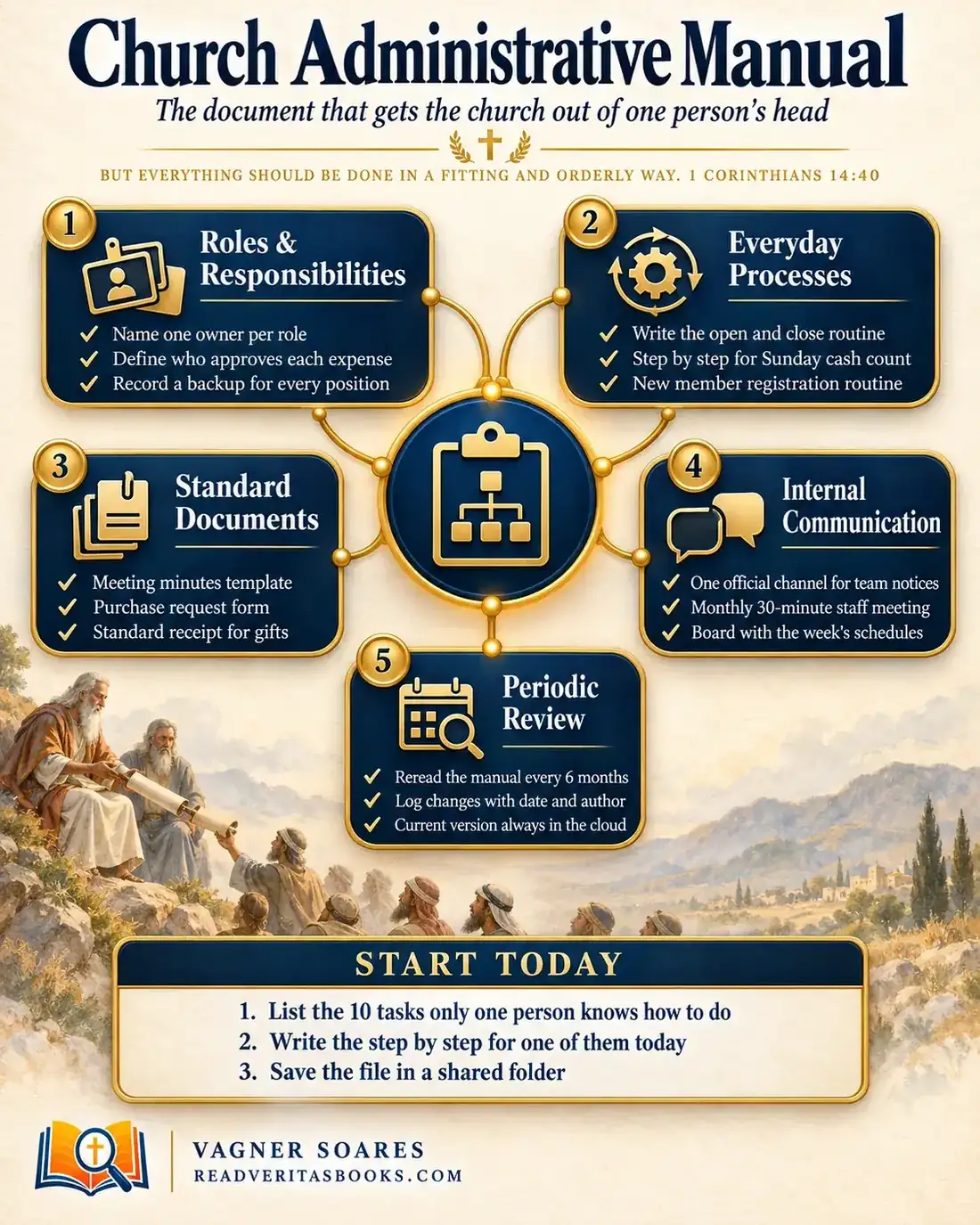
Almost every church has someone who knows everything: where the lease is filed, which key opens the storage room, how to close out the offering after the service and who has to sign a purchase request. As long as that person is around, things run smoothly. When they travel, get sick or change roles, the routine stalls, and the leadership realizes the whole administration lived in one memory.
This guide shows you how to turn that scattered knowledge into a church administrative manual organized in five blocks: roles, processes, standard documents, internal communication and review. The goal is clear pages that a brand-new volunteer can follow without calling anyone.
But everything should be done in a fitting and orderly way.
1 Corinthians 14:40
The hidden risk in the person who knows everything
The problem is never the dedicated person, who is usually the most faithful member of the team. The problem is dependence. A church where only one person knows how to close out the offering doesn't have a process. It has a favor that gets repeated every week.
That risk shows up with a change of pastor, a hospital stay, a move to another city or a season of growth. At those moments church administration runs on memories, and memories fail.
Advertisement
Moses, Jethro and a load too heavy for one
In Exodus 18, with Israel camped in the wilderness, Jethro, Moses' father-in-law, comes to visit and finds him sitting to judge the people, with crowds standing before him from morning until evening (Exodus 18:13-14). The diagnosis is blunt: “The thing that thou doest is not good”, and then, “thou art not able to perform it thyself alone” (Exodus 18:17-18).
The advice has three moves. First, Moses was to teach the people the ordinances and laws and show them “the work that they must do”. Second, he was to choose able men who feared God, men of truth, to take on part of the work. Third, he was to set a clear line: “every great matter they shall bring unto thee, but every small matter they shall judge” (Exodus 18:20-22).
The passage doesn't tell churches to copy the division into thousands, hundreds, fifties and tens, and it doesn't say Moses stopped leading: he kept the hard cases. What it shows is that putting everything on one person wears out both the leader and the people, and that the way out is to teach the work, choose people of character and define who decides what.
Paul writes 1 Corinthians 14 to a church whose gatherings were chaotic, with several people exercising gifts at once. The order he asks for has a purpose: “Let all things be done unto edifying” (1 Corinthians 14:26). Verse 40 is about worship, not the church office. But the principle carries over to administration: order is not an end in itself. It is a means of serving people better.
Roles & responsibilities: who handles what
The first block defines who handles what, who covers for whom and how far each person can decide alone. List the roles that already exist, such as treasury, office, facilities, inventory and communication, even if one person covers several of them today. For each role, write down three things: the owner, the backup and the decision limit.
The decision limit prevents the most conflict. For example, spending up to an amount agreed on by the leadership can be done by the person in charge of the area; above it, two signatures are required. When Paul organized the collection for the believers in Judea, he sent other brothers along with Titus to avoid suspicion, explaining that they were “Providing for honest things, not only in the sight of the Lord, but also in the sight of men” (2 Corinthians 8:20-21). Two signatures protect the money and the people who handle it.
How you divide roles depends on the size of the church.
Small church (up to about 100 people)
It is normal for one person to cover both the office and the treasury. What matters is that every role has a backup who knows the routine and that the offering is never counted by one person alone.
Medium-sized church
Here it pays to separate the person who counts the money, the person who makes payments and the person who reconciles the records. Each area gets its own page in the manual, and a volunteer org chart shows at a glance who reports to whom.
Large church
With paid staff, the manual needs to distinguish what the board decides, what the administration decides and what each coordinator handles. That keeps everything from landing on the senior pastor's desk, the mistake Jethro pointed out.
Everyday processes: every task written as a script
The second block describes the weekly tasks that feel obvious to whoever has done them for years. To document a church administrative procedure, follow this order:
- Ask the person who does the task to do it as usual while someone else writes down every step, without correcting anything.
- Rewrite the notes in short sentences that start with a verb: open, check, count, record, store.
- Note where the supplies are (keys, envelopes, ledger, spreadsheet) and whom to call if something goes wrong.
- Hand the script to someone who has never done the task and ask them to do it using only the text.
- Mark every point where that person hesitated and rewrite that part.
- Put the date and the reviewer's name at the top.
Start with the three highest-risk routines: opening and closing the building (keys, alarm, lights, windows, who does the final walk-through), the Sunday cash count (two people counting, totals recorded in a spreadsheet or ledger, where the money goes after the service) and new member registration (which form to use, who fills it out, where the information is stored and who makes the first contact). Members' personal data deserves extra care; check with a lawyer which data-protection rules apply to your church.
Advertisement
Standard documents: three templates ready to copy
The third block gathers templates. Without them, the church loses its history. Keep the blank versions in a clearly labeled folder and state in the manual where completed copies are filed.
Church meeting minutes template
- Minutes of the administrative leadership meeting of ___ Church, held on ___ at ___ at ___ (address).
- Present were ___ (name and role of each person), with ___ presiding.
- Topics discussed, in the order of the agenda ___.
- Decisions made ___ (each decision in one sentence, with the vote result when there was one).
- Action items ___ (what will be done, who is responsible and by when).
- There being no further business, the meeting was adjourned. These minutes were recorded by ___, secretary, and are signed by me and by ___.
If the minutes carry legal weight, check the required format with an accountant or attorney. To keep these records in order, see how to organize church minutes and official documents.
Purchase request template
- Requesting ministry ___ and name of the person asking ___.
- What needs to be bought ___, how many ___ and by when ___.
- Why the purchase is needed ___.
- Estimated cost ___ and where the quote came from ___.
- Approved by ___ on ___ (two signatures when above the agreed limit).
Receipt for gifts and donations
Always use the same format, with sequential numbering, the date, the amount written out and the signature of the person who received it. What the receipt must include depends on the rules where you live, so confirm with an accountant before printing.
Internal communication: which topic goes through which channel
The fourth block sets out how administrative information flows. The simplest way to write it down is as a decision rule:
- If it affects today's service or event, call the person in charge; don't rely on a written message alone.
- If it is a notice for the team (schedule change, approved purchase, meeting set), post it in the official channel, and only there.
- If it is a leadership decision, it goes into the minutes first and is then announced in the official channel, with the date it takes effect.
- If it involves a specific person, a mistake or a sensitive matter, handle it in a private conversation, never in the group.
Also decide who may post in the official channel, and keep a physical or digital board with the week's schedules. A monthly 30-minute meeting closes the loop, with a fixed agenda: open items from last time, upcoming events, problems in the routine and updates to the manual.
Periodic review: keeping the manual alive without turning it into bureaucracy
The fifth block makes sure the manual keeps describing the church as it really is.
How often to review
Every six months is a good starting point. On top of that, review the affected section whenever someone takes on or leaves a role.
Detail or brevity
A script that is too detailed won't be read; one that is too short leaves questions. The right measure is the new-volunteer test: if they could do the task by reading the text, it is good enough.
Cloud or paper
The official version belongs in a shared folder with controlled access. Passwords and member data never go in the manual; they live somewhere separate and restricted, as the guide to basic church digital security explains.
Who owns the version
If everyone edits, nobody knows which text counts. Choose one person to approve changes, and keep a short change log at the end of the document: date, what changed, who asked and who approved.
A worked example: the secretary who was moving away
Consider a church of 185 members whose secretary, nine years in the role, announces she will move to another city in three months. She runs the calendar, the minutes and the membership records, and she helps close out the offering.
In the first week, the pastor meets with her and with a deacon who has agreed to be her backup. Together they list 22 tasks and mark 8 that only she knows how to do. They decide to start with the Sunday cash count and member registration, the highest-risk ones.
For two Sundays, the secretary closes out the offering while the deacon writes down every step. In the third week, he does it alone, reading the script, with the treasurer beside him. He notes four questions: where the ledger is kept, what to do with checks, who takes the money to the bank and what happens if the count doesn't match. The script is rewritten with the answers.
In the second month, the leadership adopts the minutes template and the purchase request form, sets the rule that spending above the agreed limit needs two signatures and creates a single official channel for team notices. In the third month, the deacon runs the office for four weeks, with the secretary still available for questions.
On her last Sunday, the manual has 14 pages in a shared folder. The first line of the change log reads: date, "initial version, written by the secretary and reviewed by her backup", approved by the pastor. See also how to handle a leader's departure without a crisis.
First steps for this week
- Sit down with the person who carries the most roles and list, unhurriedly, everything only they know how to do.
- Pick the highest-risk task on that list, usually the Sunday cash count, and set the next date when someone will shadow it and take notes.
- Create the manual's shared folder, with a first file of roles, owners and backups.
- Put the spending limit that requires two signatures on the agenda of the next leadership meeting.
Frequently asked questions
How do you write a church operations manual from scratch?
Start with the list of roles, each with an owner, a backup and a decision limit. Then write the script for one task a week and test each one with someone who has never done it.
What is the difference between an administrative manual and the church bylaws?
The constitution and bylaws are the legal documents that establish the church and define its governance, and any internal rules must follow them. The administrative manual describes how everyday routines are carried out. It must never contradict the bylaws, so ask an attorney if you are unsure.
Who should have access to the manual?
Administrative leaders and the people in charge of each area should have full access. Passwords, bank details and member data belong in separate, restricted documents.
Does a small church really need a manual?
Yes, and it is easier to start there. A few pages are enough to record who does what, who covers for whom and how the offering count and building opening work.
A simple manual, written one task at a time, already frees your church from one person's head. For the bigger picture, read the complete guide to church administration, build a clear volunteer org chart and strengthen your team's internal communication.

Vagner Soares is a presbyter with pastoral ordination, a mentor and a digital entrepreneur with more than 10 years of experience in technology, digital marketing and education.
Keep reading
 Church administrationDigital check-in for services and events: is it worth it for your church?Decide with clear criteria whether digital check-in fits your church: benefits, risks, free and paid tools, a gradual pilot and how to handle member data.Read the article
 Church administrationChurch office management: organized reception and filing, day by dayOrganize your church office with a simple daily routine, welcoming service, physical and digital filing, a message log and a trained backup person.Read the article
 Church administration · Reference guideThe Complete Church Administration Guide, From Bylaws to Annual ReviewOrganize your church administration in five areas: roles, processes, communication and data, crises and review, with practical steps to start today.Read the article