
How to organize church minutes and official documents (and never lose a record again)
Learn what belongs in the minutes, use a simple template, keep paper and digital copies safe, and find any church document in minutes when you need it.
In this article
- Minutes are the memory that stays when people move on
- Sealed deeds and recovered scrolls: what the Bible shows about records
- What should become a minute: a rule for deciding
- A simple record template: minutes ready to adapt
- Where to store it safely, by church size
- Who signs and who files it: the path of the minutes in seven days
- Quick retrieval when needed: index, file names and what to watch
- An example: the church that couldn't find the election minutes
- Mistakes that drain the value from minutes
- Signs your archive is working
- Frequently asked questions
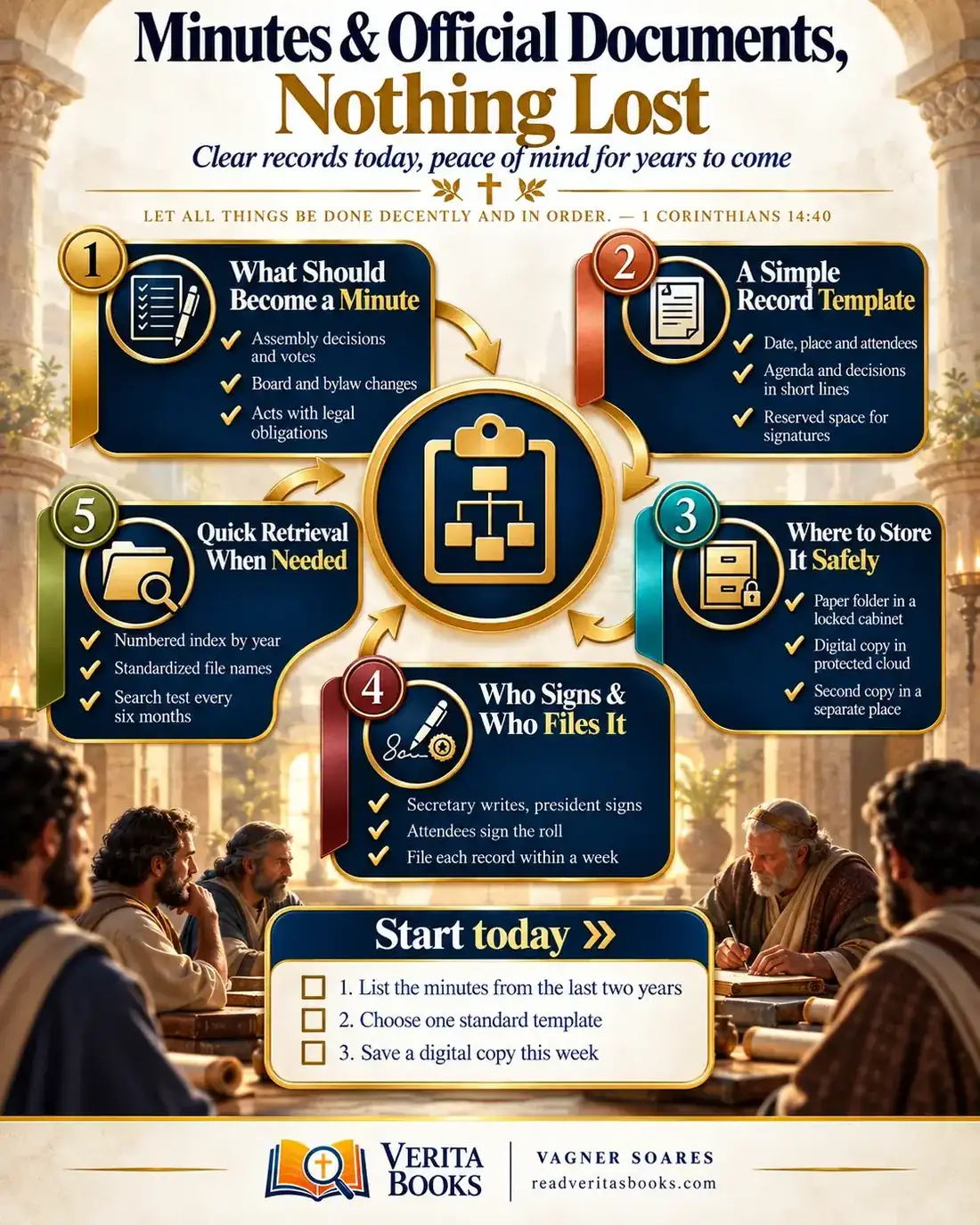
Free mind map
This whole guide on one page
The five steps in this article as an infographic you can print, pin on the notice board or send to your team.
Almost every church hits that awkward moment: someone asks when the board approved the fellowship hall renovation, or at which meeting the current treasurer was elected, and no one can produce the record. Maybe the minutes exist in a notebook at a former secretary's house or in an old email. When the bank or the accountant asks for the document, the search turns into a scramble.
The problem is rarely a lack of ability. What is missing is an agreed path, and that is what this guide builds, so the church office keeps working even when people change roles.
Let all things be done decently and in order
1 Corinthians 14:40
Minutes are the memory that stays when people move on
A meeting lasts two hours; the decision made in it may stand for twenty years. Minutes connect the two. They show what was decided, by whom and in what context, and they keep everyone from holding a private version of events.
Good records are a form of care. They protect the pastor from unfair accusations, protect the treasurer who carried out what the congregation approved, and protect the members, who have a right to know how the church decided. You don't need expensive software.
Advertisement
Sealed deeds and recovered scrolls: what the Bible shows about records
The opening verse closes Paul's instruction on worship in Corinth, where gatherings had become chaotic, and he reminds them that "God is not the author of confusion, but of peace" (1 Corinthians 14:33). The text is about order in worship, not about filing cabinets. But the principle that the gathered church should act in an orderly way reaches the way it records what it decides.
A more direct example is Jeremiah 32:10-14. With Jerusalem under siege and the prophet confined in the court of the prison, Jeremiah buys a field from his cousin Hanameel as a sign that land would one day be bought again. The deed is signed, sealed and witnessed, with one sealed copy and one open copy, and placed "in an earthen vessel, that they may continue many days." The heart of the passage is the promise of restoration; it is not meant to teach archiving. Still, it shows an important act documented with a signature, witnesses, a copy and a place that would last.
In Ezra 6:1-3, the rebuilding of the temple was being challenged by the regional governor. King Darius gave the order, "and search was made in the house of the rolls," and Cyrus's decree turned up in a scroll kept at Achmetha. An old, well-kept record settled the dispute and let the work continue. In the New Testament, the decision of the Jerusalem council was also put in writing and carried by named people (Acts 15:22-29).
The principle for church administration: decisions that affect the community deserve a clear, witnessed record, kept so that it can be found years later. Paul says something similar about the collection for Jerusalem: "Providing for honest things, not only in the sight of the Lord, but also in the sight of men" (2 Corinthians 8:21).
What should become a minute: a rule for deciding
Not every conversation needs minutes, but every official decision does. Use this rule in your meetings:
- If the decision commits money, property or contracts (buying, selling, borrowing, renovating), record it in formal board or congregational minutes, with the amount and who is authorized to act.
- If the decision changes who holds an office, write full names, positions and the start date of each elected person's term.
- If it amends the bylaws or a policy, record the exact wording approved, not just a summary.
- If the congregation voted, note the motion, the outcome and, when your bylaws require it, the votes for, against and abstaining.
- If it is a team meeting that only organizes what was already approved, such as a serving rota, a simple note in the ministry folder is enough.
- If a decision was made in a hurry by message, bring it to the next formal meeting and record that it was confirmed.
- If in doubt, write it down. Short minutes take ten minutes; missing ones can cost months.
Your bylaws usually state which decisions belong to the congregation. Some minutes may also need to be filed with a public office when the law requires it. Because this varies, confirm each case with a trusted accountant or attorney.
A simple record template: minutes ready to adapt
Good minutes are clear to someone who wasn't in the room and may read them many years from now. They don't transcribe every comment: they record the decision, the person responsible and the deadline. Adjust this template to what your bylaws require.
Minutes No. 2026-04 of the Special Congregational Meeting of (full name of the church).
On (date), at (time), at the church building located at (address), the members listed on the attached attendance roll met in a congregational meeting, called in accordance with the bylaws. (Full name), president, presided, and (full name) served as secretary. A quorum being present, the president opened the meeting with prayer and read the agenda.
Item 1, previous minutes: Minutes No. 2026-03 were read and approved without changes.
Item 2, purchase of chairs for the fellowship hall: the treasurer presented three quotes. The congregation approved the purchase of (number) chairs for a total of (amount), with (number) votes for, (number) against and (number) abstaining. (Name, role) is responsible for the purchase, by (date).
There being no further business, the president closed the meeting at (time). These minutes, read and approved, are signed by the president and the secretary.
At the bottom of the page, lines with the name and role of each signer. Number the minutes in sequence, never skipping a number, and read the decisions aloud before closing so everyone confirms what will be written.
Advertisement
Where to store it safely, by church size
Lost minutes are worth as much as minutes never written. The document belongs to the church, not to the person who wrote it, and it must survive a change of secretary. The base is the same for every church: the paper original, a digital copy, and a second copy somewhere else.
Small church (up to about 100 people)
One folder per year, with originals in numerical order, in a locking cabinet that stays at the church. Two people hold a key. Each signed set of minutes is scanned and saved to a church account, never someone's personal account, and once a month everything is copied to an external drive kept at another trusted location.
Medium-sized church
Besides the yearly folders, sort by type: congregational minutes, board minutes, bylaws and amendments, contracts and deeds. The digital folder follows the same structure, and only the church office can edit. Log who takes out any original and when it comes back.
Large church
With several meetings a month, the archive needs written rules: who creates, who approves, who may consult. A church management system or a well-organized shared folder helps, as long as the signed original stays protected. For passwords and backups, see the guide on church digital security.
At any size, minutes can contain personal information: limit access and see the guide on protecting member data. How long to keep each document is a question for your accountant.
Who signs and who files it: the path of the minutes in seven days
When everyone is responsible, no one is, and minutes sit in draft for months. Follow this sequence, adjusting the roles to your bylaws:
- Before the meeting, the secretary prepares the standard sheet with the agenda and the attendance roll.
- At the start, the roll goes around and each participant signs; it will be attached to the minutes.
- During the meeting, the secretary notes decisions, owners and deadlines, and reads them aloud at the end.
- Within two days, the secretary writes up a clean copy and gives it to the president.
- The president reads it carefully, asks for corrections if needed, and signs along with the secretary and anyone else the bylaws require.
- By the seventh day, the original is in the cabinet, the digital copy is in the church folder and the row is in the index.
If your board struggles to close decisions, the article on leadership meetings that end with decisions helps you prepare the agenda.
Quick retrieval when needed: index, file names and what to watch
Storing well is half the job; the other half is finding, and the need is usually urgent: the bank, the accountant, a question at a congregational meeting.
The core of retrieval is a spreadsheet with one row per set of minutes, numbered within each year (2026-01, 2026-02 and so on), with the date, type of meeting, main decisions in a few words, where the original is, and the link to the copy. Digital files always follow the same naming rule, starting with the date, such as "2026-03-15-minutes-congregational", so the list sorts itself.
There are trade-offs to weigh. A very detailed index makes searching easier but adds work to every set of minutes; a few well-chosen keywords are usually enough. Restricted access protects the archive, but if only one person knows the password, the church depends on that person again. And an overly sophisticated system tends to be abandoned when the secretary changes.
Every six months, ask a board member to look for any set of minutes at random and time how long it takes to find the original and the copy. The test exposes gaps before the bank does.
An example: the church that couldn't find the election minutes
Consider a church of 140 members that needs to update the authorized signers on its bank account. The bank officer asks for the minutes of the current board's election. The secretary, elected a few months earlier, can't find them. After three days of phone calls, the minutes turn up in a notebook at the former secretary's house, without the president's signature.
The following week, she goes through the calendar and the service announcements to list every official meeting of the last two years: eleven meetings, eight sets of minutes found, two unsigned and one never written, for the meeting that approved the roof repair. She logs each gap with its date and subject.
At the next meeting, the board approves the single template and the seven-day path. For the roof decision, the pastor asks the accountant how best to regularize it, and the board records in new minutes that it confirms that decision, with the original date and the amount spent. A cabinet with two keys is set aside in the church office, the minutes are scanned and entered in the spreadsheet, and the treasurer takes on the monthly copy to the external drive. Six months later, a deacon runs the search test and gets the original and the link to the copy within a few minutes.
Mistakes that drain the value from minutes
- Writing the minutes days later from memory, when everyone remembers it differently.
- Recording the whole discussion and forgetting the decision, the owner and the deadline.
- Leaving originals at home or on the phone of whoever wrote them.
- Writing over signed minutes instead of recording the correction at the next meeting.
- Keeping the password and the key with only one person.
Signs your archive is working
- Any board member can find the minutes of an election in a few minutes without calling anyone.
- There are no skipped numbers in this year's sequence of minutes.
- A change of secretary means handing over a key, a password and a spreadsheet.
Frequently asked questions
How do you write church meeting minutes step by step?
Start with the date, time, place, who presided and who served as secretary, and attach the attendance roll. Record each agenda item with the decision, the result of any vote, the person responsible and the deadline. Finish with the closing and the signatures your bylaws require.
Do church minutes have to be handwritten in a special minute book?
Not necessarily. Many churches use typed pages that are numbered, signed and kept in sequence. The accepted format may depend on your bylaws and local requirements, so check with your church's accountant or attorney.
Can I correct minutes after they are signed?
It's best not to change the signed text. If there is an error, record the correction in the minutes of the next meeting, explaining what changed and why.
Do online meetings need minutes too?
Yes, whenever official decisions are made in them. Note that the meeting was held online, the platform used and who took part. To learn how to collect signatures, ask a professional.
Well-kept minutes honor your church's decisions and protect those who will lead after you. To keep building this order, see how to run an organized church office day to day, how to put together a church administrative manual, and how to manage contracts with vendors.

Vagner Soares is a presbyter with pastoral ordination, a mentor and a digital entrepreneur with more than 10 years of experience in technology, digital marketing and education.
Keep reading
 Church administrationShared calendar: how to organize church rooms and spaces without scheduling conflictsOrganize church rooms and times in one shared calendar, with clear booking and priority rules, automatic confirmations and a weekly review to avoid clashes.Read the article
 Church administrationLeadership conflict without dividing the church: settle it before it reaches the pulpitLearn to spot early signs of conflict between leaders, mediate fairly, communicate with your church carefully and rebuild trust on your leadership team.Read the article
 Church administration · Reference guideThe Complete Church Administration Guide, From Bylaws to Annual ReviewOrganize your church administration in five areas: roles, processes, communication and data, crises and review, with practical steps to start today.Read the article