
Shared calendar: how to organize church rooms and spaces without scheduling conflicts
Organize church rooms and times in one shared calendar, with clear booking and priority rules, automatic confirmations and a weekly review to avoid clashes.
In this article
- Why church scheduling conflicts are a matter of care
- Time, order and other people's needs in Scripture
- One single calendar: one source of truth
- Who can book a room: requests, approval and outside use
- Clear priority rules for deciding without friction
- Automatic confirmation: three notices for every booking
- Weekly review: fifteen minutes that prevent the Sunday argument
- Example: a church of 210 members ends the room wars
- Signs your shared calendar is working
- Mistakes that bring the double bookings back
- Frequently asked questions
Free mind map
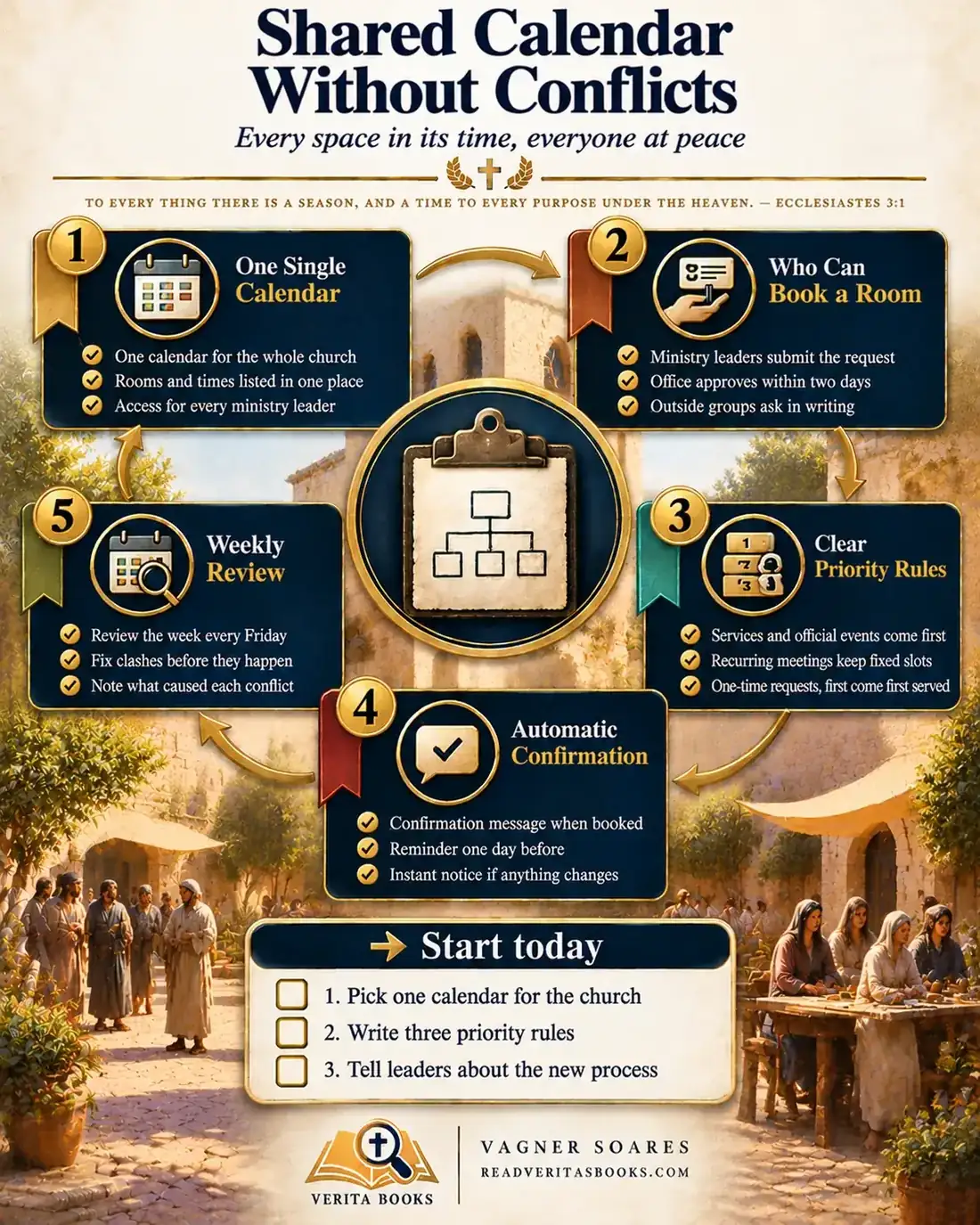
This whole guide on one page
The five steps in this article as an infographic you can print, pin on the notice board or send to your team.
On Sunday afternoon the youth band shows up to rehearse and finds the room taken by the marriage class. On Wednesday the prayer team learns that the fellowship hall was lent out for a birthday party. Nobody acted in bad faith: each leader made arrangements with a different person, and the church's real schedule lived in notebooks and group chats.
This is almost never a character problem; it is a process problem. This guide shows you how to build a shared church calendar from five pieces: one single calendar, rules about who can book, clear priorities, automatic confirmation and a weekly review.
To every thing there is a season, and a time to every purpose under the heaven
Ecclesiastes 3:1
Why church scheduling conflicts are a matter of care
A double booking looks like a small thing, but it shows that the church has no shared agreement on how to use what belongs to everyone. When ministries compete for the same room, whoever asks first, holds the key or pushes hardest wins. The volunteer who lost the space goes home feeling that their work matters less.
Repeat that a few times and you get resentment between groups and a pastor who referees room disputes. A well-run calendar is not red tape. It is a concrete way to honor people's time and show that every group has a place in the house.
Advertisement
Time, order and other people's needs in Scripture
The verse from Ecclesiastes that opens this guide belongs to the Preacher's reflection on the seasons of life: being born and dying, planting and harvesting, weeping and laughing. It does not teach calendar management. It says that human life unfolds in times that are in God's hands. For administration the principle is modest but real: every activity has its moment, and pretending everything fits into the same slot ignores a limit built into creation.
In 1 Corinthians 14:26-40, Paul writes to a church whose worship had turned into a contest: several people spoke at once and no one was built up. He asks that those who prophesy speak "one by one, that all may learn, and all may be comforted" (1 Corinthians 14:31), because "God is not the author of confusion, but of peace" (1 Corinthians 14:33). The passage is about worship, not room bookings. But the principle carries over: order means giving everyone a turn so that everyone is served. "Let all things be done decently and in order" (1 Corinthians 14:40).
In Acts 6:1-4, the Greek-speaking widows were being overlooked in the daily distribution of food. The apostles did not ignore the complaint, nor did they try to fix it themselves: they asked the community to choose people of good reputation to take charge of that service. The text does not create a church office position, but it shows that a practical problem causing tension between groups deserves clearly assigned people. And Philippians 2:4 sums up the attitude that makes any priority rule work: "Look not every man on his own things, but every man also on the things of others."
One single calendar: one source of truth
As long as there is a notebook in the office, a spreadsheet on the pastor's laptop and side agreements in the leaders' group chat, clashes will keep happening, because nobody sees the whole picture. A calendar only works if it is the only one.
Before picking a tool, take stock of everything that can be booked: sanctuary, fellowship hall, each classroom, kitchen, projector, portable sound system. Give each one a fixed name ("Room 3, ground floor", not "Mrs. Smith's room") and note its capacity.
How to adapt it to your church's size
In a small church of up to about 100 people, a shared spreadsheet with one tab per space is enough, or a whiteboard in the office photographed each week for the leaders' chat. What matters is having one person responsible and treating that board as the official reference.
In a mid-sized church, an online calendar with a separate calendar for each space works well: leaders can see everything, but only the office creates and edits events.
In a large church, or one with more than one building, consider a church management system that blocks overlapping bookings. It does not replace the rules; it just applies what leadership decided more quickly.
Who can book a room: requests, approval and outside use
A calendar that everyone can edit soon becomes no one's responsibility. In most churches it works well for requests to come from each ministry leader and for approval to sit with the church office (or a designated volunteer), which sees every request at once. Agree on a response time, for example two working days, and keep it.
Here is a model internal request form, for an online form or a half sheet of paper:
- Ministry and name of the leader responsible for the booking
- Space requested and a second choice
- Date, arrival and departure times (including setup and cleanup)
- Expected number of people and equipment needed
- Who picks up and who returns the key
- One-time or recurring (and until when)
For outside requests, such as a family wanting the hall for a wedding, use a written agreement. For example:
"As the person responsible for the event described above, I agree to use the space only during the approved hours, to follow the church's guidelines, to leave the premises clean and tidy and to return the keys by the agreed time. Any damage that occurs during use will be reported to the church office the same day."
If there is a fee or donation for the use, or if tickets or food are sold, check the tax and liability implications with a local accountant or lawyer first.
Advertisement
Clear priority rules for deciding without friction
Even with one calendar, two groups will want the same space. With written, well-known rules, the office simply applies what leadership has already decided. Use this order:
- If it is a worship service or an official church event (conference, baptism, members' meeting), it comes first. These go on the calendar during annual planning, before any other request.
- If it is a regular meeting already set up as recurring (rehearsal, Sunday school, small group), it keeps its slot. Whoever comes later looks for another space or another day.
- If two one-time requests want the same slot, the order of arrival recorded on the form decides.
- If an important one-time request clashes with a regular meeting, the office talks with both leaders and suggests switching rooms or times. The regular meeting only gives way with its leader's agreement.
- If no agreement is reached, the case goes to the next leadership meeting, and the decision is recorded as a reference for similar cases.
Review the list of regular meetings every six months: a group that has stopped meeting still occupies the room on paper. An approved annual ministry calendar helps you enter every official event at the start of the year.
Automatic confirmation: three notices for every booking
Many conflicts start with a misunderstanding: the booking was still pending, the time changed and nobody said so, the cleaning team did not know about the event. Set up the flow like this:
- Fix a standard format for every message: space, date, start and end time, person responsible and who handles the key, always in that order.
- Set up the approval notice. Online calendars send invitations automatically, and a form linked to a spreadsheet can trigger an email. Without digital tools, the office sends something like: "Booking confirmed: Room 3, Saturday, 3:00 to 5:30 pm, youth leader responsible. Key available at the office until 2:45 pm."
- Schedule a reminder the day before, covering who opens, who locks up and who resets the room for the next group.
- Agree on the change notice: if the event is moved or canceled, the office updates the calendar right away, tells everyone involved and frees up the slot.
Make it clear to leaders from day one: a booking without a confirmation does not exist yet.
Weekly review: fifteen minutes that prevent the Sunday argument
No system runs itself. Choose a fixed time, ideally on Friday, for the office to look over the whole coming week.
What to look for
Overlapping bookings, events with no one responsible, spaces that need cleaning between uses and equipment requested by two groups on the same day. When you find a clash, talk to both leaders before the weekend. Fixing it on Friday costs one message; on Sunday, an awkward scene.
When a conflict happens anyway
Write down the cause without looking for someone to blame: was a rule missing, did someone go around the process, or did communication break down? A simple log with date, space and cause reveals patterns nobody notices from memory. Bring them to the leadership meeting every quarter, for example. And do not turn the review into policing: if the same person keeps skipping the process, that is a pastoral conversation, held in private.
Example: a church of 210 members ends the room wars
Picture a church of 210 members with a sanctuary, a fellowship hall, three classrooms and a kitchen. The schedule lived in the notebook of the volunteer who staffs the office on Tuesdays and Thursdays, but the pastor also lent out spaces whenever someone asked in the hallway. In a single month, youth rehearsal clashed with a baby shower in the hall, and the children's Sunday school found its classroom occupied.
The pastor proposed a three-month trial to the leadership team. The volunteer took inventory (six spaces and four pieces of equipment), built a spreadsheet with one tab per space and entered the services, the dates from the annual calendar and the eleven weekly regular meetings first. Leadership approved the five priority rules and the request form. The pastor committed to answering every hallway request with "fill in the form, the office will confirm within two days".
Every Friday the volunteer reviewed the coming week and logged each problem. After two months the log showed only two conflicts, both from bookings made outside the form. At the quarterly review, leadership decided the hall would only be lent to outside groups with a signed agreement. The rules went into the church administrative manual, and a second volunteer was trained as a backup.
Signs your shared calendar is working
Leaders check the calendar before announcing an activity, not afterward. Requests come in through the form without anyone having to remind people. Clashes get sorted out on Friday, and nobody calls the pastor to decide whose room it is. When a conflict does arise, the conversation is about the process ("what was missing?"), not about who matters more.
Mistakes that bring the double bookings back
Keeping backup schedules "just in case" is the most common one: two sources always end up disagreeing. Archive the old ones and make it clear that only the official calendar counts.
Leaving the rules in the head of whoever runs the office means everything goes back to improvising when that person is away. Write them down, name a backup and keep them with the records of an organized church office day to day.
Granting exceptions without criteria weakens the system; when an exception is fair, explain why and record it. And do not forget equipment: two groups can have different rooms and the same projector. If the church is not sure what it owns, start with an inventory of church property.
Frequently asked questions
Does a small church really need a shared calendar?
Yes, in a simple form. Even with two or three rooms, one calendar and a few written rules prevent mix-ups and free the pastor from refereeing every conflict.
Who should handle church room booking if there is no office staff?
An organized volunteer who can answer requests within the agreed time. What matters is that one specific person owns it, everyone knows who it is, and there is a backup for when they are away.
Do I need paid software for church facility scheduling?
Not to start. Free online calendars and shared spreadsheets are enough for most churches. Dedicated software only makes sense once you have many spaces, several buildings or a high volume of requests.
Can the church lend its hall for outside events?
It can, if leadership believes this serves the church's mission. Always use a written agreement naming the person responsible, the hours and the condition the space must be left in. If money changes hands, check with a local accountant or lawyer first.
Organizing your church's spaces is a simple act of respect: every group knows where and when it can serve, and nobody has to fight over what belongs to everyone. To go further, see how to run an organized church office day to day, how to gather your rules in a church administrative manual and how to coordinate schedules when you have multiple locations or campuses.

Vagner Soares is a presbyter with pastoral ordination, a mentor and a digital entrepreneur with more than 10 years of experience in technology, digital marketing and education.
Keep reading
 Church administrationHow to manage church contracts with vendors and service providersGet your church's contracts in order: what every agreement needs, how to compare proposals, track renewals, keep originals safe and evaluate vendors.Read the article
 Church administrationHow to organize church minutes and official documents (and never lose a record again)Learn what belongs in the minutes, use a simple template, keep paper and digital copies safe, and find any church document in minutes when you need it.Read the article
 Church administration · Reference guideThe Complete Church Administration Guide, From Bylaws to Annual ReviewOrganize your church administration in five areas: roles, processes, communication and data, crises and review, with practical steps to start today.Read the article